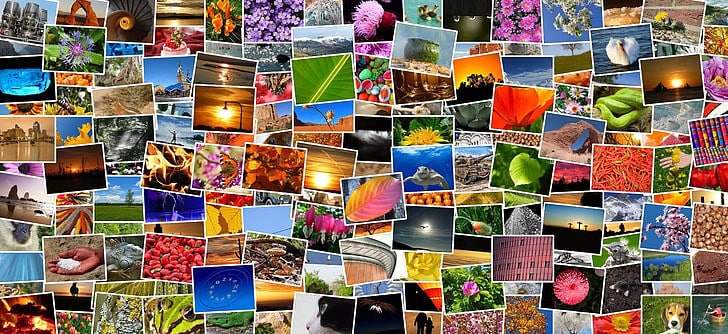
In this article, I am going to cover strategies for organizing digital photographs so you can keep your ever-growing collection in check.
Your memories will stay secure and easy to access by employing structured folders, meaningful file names, advanced photo management software, and automatic cloud backups. Let’s make your digital photo library easier to navigate.
Key Points & Best Methods For Organizing Digital Photos List
| Method | Key Point |
|---|---|
| Use a Consistent Folder Structure | Organize photos by year, month, or event for easy navigation. |
| Rename Files with Meaningful Names | Use descriptive names like “2025-06-22_Birthday_Party.jpg”. |
| Use Photo Management Software | Tools like Google Photos, Apple Photos, or Adobe Lightroom help automate sorting. |
| Tag and Keyword Photos | Add metadata tags to make searching faster and easier. |
| Delete Duplicates and Blurry Shots | Regularly clean up to save space and reduce clutter. |
| Create Albums or Collections | Group related images together for events, trips, or themes. |
| Use Cloud Storage and Syncing | Backup and access photos across devices with services like Google Drive or iCloud. |
| Backup Locally and Off-Site | Always keep a second (or third) copy on external drives or other platforms. |
| Add Captions or Descriptions | Write notes about who, what, when, and where to preserve memories. |
| Regular Maintenance and Review | Schedule time to organize and update your photo library monthly or quarterly. |
10 Best Methods For Organizing Digital Photos
1.Use a Consistent Folder Structure
The simplest method to organize your digital photos is by creating a consistent folder structure. It is very effective when using a clear hierarchy like “Year > Month > Event” to sort images chronologically and even by occasion.
This system allows you to easily find pictures without having to use specialized software. For instance, “2025 > June > Graduation” works well. Uniformity can also be achieved across devices when the same method is used.

A logical structure reduces clutter while improving backup processes. Avoid systems that require reorganization over time to prevent frustration down the road.
| Feature | Description |
|---|---|
| Chronological Organization | Arrange folders by year, month, or date for easy browsing. |
| Event-Based Naming | Use clear event names like “Vacation_2025” for instant recognition. |
| Hierarchical Structure | Maintain a parent-child folder system for tidy navigation. |
| Scalability | Easily expands as your photo collection grows. |
| Cross-Platform Compatibility | Works well across Windows, macOS, Linux, and cloud platforms. |
2.Rename Files with Meaningful Names
Identifying images with file names “IMG2345.JPG” is very difficult. Photos can be renamed using consistent patterns along with the date, event, and subject. One example would be “2025-06-22FamilyPicnic.jpg”.
This method assists immensely in searching files as well as sorting them alphabetically or chronologically. Many photo management applications provide options for renaming files in batches which speeds up the process.
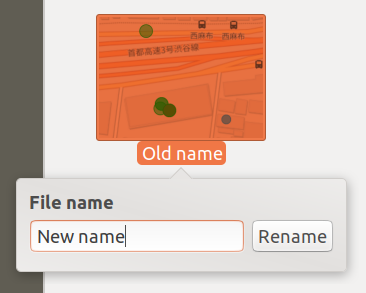
This is particularly helpful when sharing folders or utilizing cloud storage so others are able to easily identifying pictures through their file names. Always keep the descriptions short but precise to achieve better results.
| Feature | Description |
|---|---|
| Descriptive Naming | Identify content at a glance with context-rich file names. |
| Date Format | Include dates (e.g., YYYY-MM-DD) for sorting and reference. |
| Batch Rename Support | Rename multiple files efficiently using software tools. |
| Improved Searchability | Enables quick file searches by event, date, or subject. |
| Compatibility | Works across operating systems and photo management tools. |
3.Use Photo Management Software
Sofware like Google Photos, Apple Photos, Adobe Lightroom, and DigiKam streamline the process of managing and editing your photos collection by keeping everything organized in one app.
These programs provide automated sorting along with facial recognition tagging and advanced search optionsEdit them right in the app and have them synced across devices. Most sofware today offers cloud capabilities, sharing albums stored on the cloud with friends nad family.

Advanced AI can even sort files based on location or events. While newer options offer more functionality, simple tools often boost efficiency when it comes to managing data.
While some software is tailored specifically to user requirements or integrate well into their existing ecosystem making changes for better photo management can go a long way.
| Feature | Description |
|---|---|
| Auto-Sorting | Automatically categorizes photos by date, location, or people. |
| Editing Tools | Basic to advanced photo editing capabilities. |
| Face & Object Recognition | Identifies and tags people and objects in images. |
| Cloud Sync | Seamless syncing across devices and cloud. |
| Smart Search | Search by people, places, or events using AI. |
4.Tag and Keyword Photos
Applying tags or keywords to your photos makes it easier to find them later. Tags can be names, places, occasions or even some broad categories such as, “beach,” ‘wedding,” or ‘vacation.’ Most photo management programs allow you to bulk-tag photos which is a real time-saver.

This is helpful when photos are stored in different folders or for many types of similar pictures like sunsets or baby photos. After tagging, searching through thousands of images becomes very fast.
Some tools equipped with facial recognition technology can auto-tag people too. Following a defined system for tagging makes the process streamlined and increases accuracy making it possible for you to easily locate the photo you need within seconds.
| Feature | Description |
|---|---|
| Custom Tagging | Add personalized tags like “birthday” or “vacation.” |
| Bulk Tagging | Apply tags to multiple images simultaneously. |
| Metadata Integration | Tags are saved within image metadata. |
| Cross-Platform Search | Find photos by tags across devices and platforms. |
| AI Assistance | Auto-tags using AI in modern photo apps. |
5.Delete Duplicates and Blurry Shots
Removing duplicates and blurry photos not only improves your photo collection, but also saves storage space and mental energy. Quite a number of people hold on to repetitive or fuzzy images which accumulate with time.
Consider using software tools or duplicate finding programs to scan for these pictures and remove them more easily.

Try doing cleaning sessions every month or quarter depending on what works best for you. Deleting the majority of unimportant images ensures that backups won’t waste space dealing with irrelevant files.
| Feature | Description |
|---|---|
| Duplicate Finder Tools | Identify and delete duplicate files. |
| Blurry/Low-Quality Detection | Spot and remove poor-quality images. |
| Storage Optimization | Frees up valuable digital space. |
| Manual Review Option | Allows human input for final deletion. |
| Time Efficiency | Speeds up browsing and backup operations. |
6.Create Albums or Collections
Albums offer an easy way to categorize pictures from different sources as long as they share common themes, such as a trip to Paris, your babys first year, or even favorite hobbies.
Albums can also be used to view and share pictures by theme while allowing multiple uses across other albums since they do not “move” the files; instead, they reference them.

Their digital nature allows captions, tags, and descriptions further enhancing user engagement. The curated contextual sets provide meaning, thus enriching storytelling around memories making captions adding accessibility feel effortless.
| Feature | Description |
|---|---|
| Thematic Grouping | Organize by themes like “Family,” “Travel,” or “Pets.” |
| Drag-and-Drop Support | Easily move photos into albums without duplicating. |
| Virtual Organization | Albums reference photos without altering file location. |
| Easy Sharing | Share specific albums with others. |
| Slideshow Ready | Albums are great for automated slideshows. |
7.Use Cloud Storage and Syncing
With cloud storage, Google Photos, iCloud, Amazon Photos, OneDrive and many others allow access to images anywhere anytime. They are also synced which means any edits done will be updated across all platforms used.
Data stored in the cloud protects against data loss due to device failure or even theft. The sharing of photos with family and friends becomes easier.

Some services use AI for features like automatic album creation and photo enhancements. To ensure seamless photo organization choose a reliable cloud provider and enable auto-sync.
| Feature | Description |
|---|---|
| Auto Backup | Automatically uploads new photos to the cloud. |
| Device Sync | Keeps images updated across all devices. |
| Sharing Features | Easily send albums or photos via links. |
| Secure Storage | Photos protected with encryption and redundancy. |
| AI Sorting | Smart features like face recognition and event detection. |
8.Backup Locally and Off-Site
Limiting backups to one storage method, whether it’s a computer or the cloud is a bad idea. Always maintain at least two backups—one off-site such as cloud-based services, and one local like external hard drives.

This way, your photos are safeguarded in case your device gets lost or damaged. Automated backup services can further enhance convenience for you by managing them automatically instead of manually which can be easily forgotten.
Routinely test and rotate backup drives to ensure the backed up data is still retrievable. Following the 3-2-1 guideline where three copies are kept on two different types of media (one copy off-site) ensures balanced protection.
| Feature | Description |
|---|---|
| Redundancy | Prevents data loss with multiple copies. |
| Local Backup | Quick recovery from external hard drives. |
| Cloud Backup | Off-site protection against local disasters. |
| Scheduled Backups | Automate regular saving intervals. |
| 3-2-1 Rule Compliance | Encourages 3 total copies, 2 different media, 1 off-site. |
9.Add Captions or Descriptions
Photos help us capture wonderful moments in our lives, and adding a caption provides deeper context. Consider the photo of someone smiling—it’s nice to look at, but the true value lies in knowing that it was taken during “Grandma’s 80th birthday, June 2025.
Most editing apps have provisions for inline text which helps attach context with captions for memories.

Explaining details reinforces understanding for future generations about the person/people or events involving them and is great when making albums or shows for collection summaries. While this may seem trivial now, it’s recommended to add captions soon after taking photos while the data is fresh.
| Feature | Description |
|---|---|
| Text Annotation | Add stories, names, and notes directly to photos. |
| Metadata Storage | Captions saved with the image file. |
| Enhanced Memory Recall | Helps you remember moments years later. |
| Shareable Context | Viewers understand the photo without needing extra explanation. |
| Integration with Photo Books | Captions transfer easily when creating albums or books. |
10.Regular Maintenance and Review
Monthly or quarterly schedules are better suited in evaluating areas like managing your photograph library files, clearing repetitive photos, updating backups, renaming images and even creating new folders!
Routine maintenance makes a huge difference by simplifying cluttered reserves relationally instead of waiting years down the line where piles worth of work will await you without any structure threatening hold still over free time.
There is no bound requirement towards what can be done so effortlessly glancing – meanwhile offering an efficient way out therefore allowing neat meaningful restorations along beautiful annotations added alongside treasured blessed memories
Waiting to be uncovered instead beckoning pristine enclosure relish soft gaze smile every touch slight shake grace gifting touching not only eyes smile entire heart Makes it mess reclaiming digital accurate preserving joyful essence timeless.
| Feature | Description |
|---|---|
| Scheduled Checkups | Monthly or quarterly sessions for organization. |
| Cleanup Routine | Delete unneeded photos, duplicates, and edits. |
| Tag and Caption Updates | Add missed tags or update older details. |
| Storage Management | Review and adjust backups and cloud storage. |
| Photo Rediscovery | Enjoy and re-share forgotten memories. |
Conclusion
In summary, effective digital photo organization allows effortless retrieval and preservation of memories while reducing clutter.
By employing structured folders, meaningful file names, dedicated photo software, and regular backups, you can guarantee the safety and accessibility of your collection.
With consistent tagging, creation of albums, and routine maintenance, you can manage your photos for years to come while enjoying them anytime. Start today obtaun lasting clarity.
FAQ
Why should I organize my digital photos?
Organizing your photos helps you find memories quickly, reduces digital clutter, and protects against data loss. It also makes sharing and creating photo albums or books much easier.
What’s the best way to structure photo folders?
Use a consistent format like Year > Month > Event (e.g., 2025 > June > Vacation). This helps keep your collection chronological and easy to navigate.
What tools can help with photo organization?
Popular tools include Google Photos, Apple Photos, Adobe Lightroom, DigiKam, and Mylio. These apps offer features like auto-tagging, cloud sync, albums, and editing.