Kraken Crypto Exchange Banner Ad
Bitcoin icon
BTC $65,000.00 +0.00%
Ethereum icon
ETH $3,500.00 +0.00%
XRP icon
XRP $0.6000 +0.00%
BNB icon
BNB $600.00 +0.00%
Solana icon
SOL $150.00 +0.00%
Dogecoin icon
DOGE $0.1500 +0.00%
Cardano icon
ADA $0.4000 +0.00%
TRON icon
TRX $0.1200 +0.00%
Chainlink icon
LINK $15.00 +0.00%
Avalanche icon
AVAX $35.00 +0.00%
By using this site, you agree to the Privacy Policy and Terms of Use.
Accept
  • ADVERTISEMENT
  • MEDIA KIT
  • CONTACT
  • SUBMIT PR
  • GUEST POST
  • ABOUT US
  • TEAM
  • DMCA
  • DISCLAIMER
  • PRIVACY POLICY
  • MORE
    • llms.txt
    • Newsletter
    • Official Verify
    • Editorial Policy
    • Term Of Use
    • SITEMAP
Reading: How To Troubleshoot Software Issues – Step-by-Step Guide
coinworldstory logo coinworldstory logo
  • HOME
  • CRYPTO
    • AI
    • BOTS
    • ICO
    • AIRDROP
      • Featured Airdrops
    • Price Prediction
    • EXCHANGE
      • Best Centralized Exchange List 2026
      • Best Decentralized Exchange List 2025
    • ALTCOIN
    • Alt Coin Signal
    • Crypto Analysis
    • Bitcoin Loan
    • Bitcoin Mining
    • WALLETPRO
  • PR
    PR
    If You Looking For Submit Cryptocurrency Press Releases Than Coinworldstory Is Best Choice For Crypto Press Release Submission
    Show More
    Top News
    BitMine Immersion (BMNR) Announces ETH Holdings Exceed 2% of Ethereum Network With ETH Holdings Exceeding 2.4 Million Tokens and Total Crypto and Cash Holdings of $11.4 Billion
    BitMine Immersion (BMNR) Announces ETH Holdings Exceed 2% of Ethereum Network With ETH Holdings Exceeding 2.4 Million Tokens and Total Crypto and Cash Holdings of $11.4 Billion
    13/02/2026
    1inch brending pr 1759284304k1VHQYD4Vr
    1inch rebrands to reflect broader mission uniting DeFi and global finance
    01/10/2025
    10 Top Payment Tokens by Market Capitalization In 2026
    BitMine Immersion (BMNR) Announces ETH Holdings Exceeding 3.03 Million Tokens and Total Crypto and Cash Holdings of $12.9 Billion
    13/10/2025
    Latest News
    Carbon Launches TradFi-Native On-Chain Derivatives Venue With 950+ Markets in One Account
    07/08/2026
    Blockchain Life Returns to Dubai — Featuring the Debut of AI Future!
    06/08/2026
    ChangeNOW Brings Martin Masser Into Its Crypto Super App
    05/08/2026
    Indonesia Blockchain Week (IDBW) 2026 Flags RWA Tokenization and High-Level Enterprise Networking as Major Business Priorities
    03/08/2026
  • NEWS
    • Mining
    • Altcoins
    • Ban
    • BANKING/FINANCE NEWS
    • Bitcoin
    • Blockchain
    • CRYPTO CRIME
    • Ethereum
    • Exchange News
    • Government News
    NEWSShow More
    10 Best High Rewards Crypto Platforms for Maximum Earnings
    10 Best Institutional Trading Technology Platforms in 2026
    31/07/2026
    10 Hidden Liquidity Features Modern Brokers Secretly Use
    10 Hidden Liquidity Features Modern Brokers Secretly Use
    29/05/2026
    10 Apps That Show What You Should Have Done Instead
    10 Apps That Show What You Should Have Done Instead
    29/05/2026
    10 Best Crypto Conferences to Attend in 2026
    10 Best Crypto Conferences to Attend in 2026
    29/05/2026
    Emerging Markets Favor Stablecoins Over Bitcoin
    Emerging Markets Favor Stablecoins Over Bitcoin
    29/05/2026
  • MORE
    • Guide
    • Only Best
    • Off Topic
    • Best Affiliate Marketing
    • Best Affiliate Programs
    • BOTS
    • Trusted Currency Exchanger Platform
    • Blockchain Games
    • Metaverse Review : Best Metaverse Program Review
    • Online Survey
    • Payment Platform
  • VPN
  • List
    • Best Crypto Casinos In 2026
    • Best Crypto Wallets List 2026
    • Best Crypto Exchanges List 2026
    • Best Crypto Lawyers & Farm
    • Best Crypto Tools List 2026
    • Crypto Regulations Worldwide 2026
    • Best Crypto Prediction Markets
  • Contact Us
  • FAQ
Reading: How To Troubleshoot Software Issues – Step-by-Step Guide
Font ResizerAa
CoinworldstoryCoinworldstory
  • ADVERTISEMENT
  • MEDIA KIT
  • CONTACT
  • SUBMIT PR
  • GUEST POST
  • ABOUT US
  • TEAM
  • DMCA
  • DISCLAIMER
  • PRIVACY POLICY
  • MORE
Search
  • HOME
  • CRYPTO
    • AI
    • BOTS
    • ICO
    • AIRDROP
    • Price Prediction
    • EXCHANGE
    • ALTCOIN
    • Alt Coin Signal
    • Crypto Analysis
    • Bitcoin Loan
    • Bitcoin Mining
    • WALLETPRO
  • PR
  • NEWS
    • Mining
    • Altcoins
    • Ban
    • BANKING/FINANCE NEWS
    • Bitcoin
    • Blockchain
    • CRYPTO CRIME
    • Ethereum
    • Exchange News
    • Government News
  • MORE
    • Guide
    • Only Best
    • Off Topic
    • Best Affiliate Marketing
    • Best Affiliate Programs
    • BOTS
    • Trusted Currency Exchanger Platform
    • Blockchain Games
    • Metaverse Review : Best Metaverse Program Review
    • Online Survey
    • Payment Platform
  • VPN
  • List
    • Best Crypto Casinos In 2026
    • Best Crypto Wallets List 2026
    • Best Crypto Exchanges List 2026
    • Best Crypto Lawyers & Farm
    • Best Crypto Tools List 2026
    • Crypto Regulations Worldwide 2026
    • Best Crypto Prediction Markets
  • Contact Us
  • FAQ

Trending →

10 Best Identity Verification Platforms for Secure Onboarding

By Gixona
08/08/2026

10 Best eKYC Providers In 2026 for Secure Identity Verification

By Gixona
08/08/2026

10 Best AI Observability Platforms for Smarter AI Monitoring

By Gixona
08/08/2026

10 Best Enterprise AI Gateway Platforms for AI Security

By Gixona
08/08/2026

10 Best AI Guardrail Platforms for Safer AI Systems

By Gixona
07/08/2026
Follow US
Email - [email protected]

Home » How To Troubleshoot Software Issues – Step-by-Step Guide

Software

How To Troubleshoot Software Issues – Step-by-Step Guide

Sam Usa
Last updated: 24/09/2025 12:37 PM
By Sam Usa
Share
8 Min Read
How To Troubleshoot Software Issues – Step-by-Step Guide
SHARE

In this blog post, I’ll discuss how to resolve software problems methodically using logical sequences. Knowing how to troubleshoot handles things such as slow performance, installation issues and application crashes.

Contents
  • What is Software Troubleshoot?
  • How To Troubleshoot Software Issues
    • Step-by-Step Guide
    • 1. Identify The Problem
    • 2. Restart Your PC
    • 3. Use Windows Troubleshoot
    • 4. Check for Available Updates
    • 5: Uninstall Then Reinstall the Problematic Software Ended Up Being Easier Than I Thought!
    • 6 Use System File Checker Window Will Pop Up
    • 7. Utilize System Restore (if applicable)
    • 8. Check Compatibility Mode
    • 9. Get Help
  • Why does restarting fix Many Software Issues?
    • Clears Memory (RAM)
    • Stops Background Processes
    • Releases System Resources
    • Reloads Drivers and Services
  • Common Software Issues and Solutions
    • Application Crashes or Freezing
    • Installation Failures
    • Performance Lags or Slow Response
    • Network Connectivity Issues
    • Compatibility Errors
  • Advanced Troubleshooting Tips
  • Conclusion
  • FAQ
    • What is software troubleshooting?
    • Why does restarting fix many software issues?
    • What if the program is crashing or freezing?

From restarting your device to built-in system tools, I will share methods that save time while giving clarity and confidence when working with devices.

What is Software Troubleshoot?

Software troubleshooting refers to the process of identifying and resolving issues that occur within a software program or system. The following symptoms indicate that analysis is necessary: crashes, error messages, sluggish performance, and failure to open.

Examining these may involve restarting the application, checking for updates, reviewing system requirements, or reinstalling the software. Effective troubleshooting returns systems to normal operational state while also restoring smooth user experience.

- Advertisement -

It’s important for everyone involved in a work environment – users, developers, IT professionals – who seeks uninterrupted work efficiency and minimal downtime. In software troubleshooting, as in any other area, effective processes begin with simple approaches and advance towards more sophisticated methods as required.

How To Troubleshoot Software Issues

Example: Troubleshooting Software Issues in Windows 11
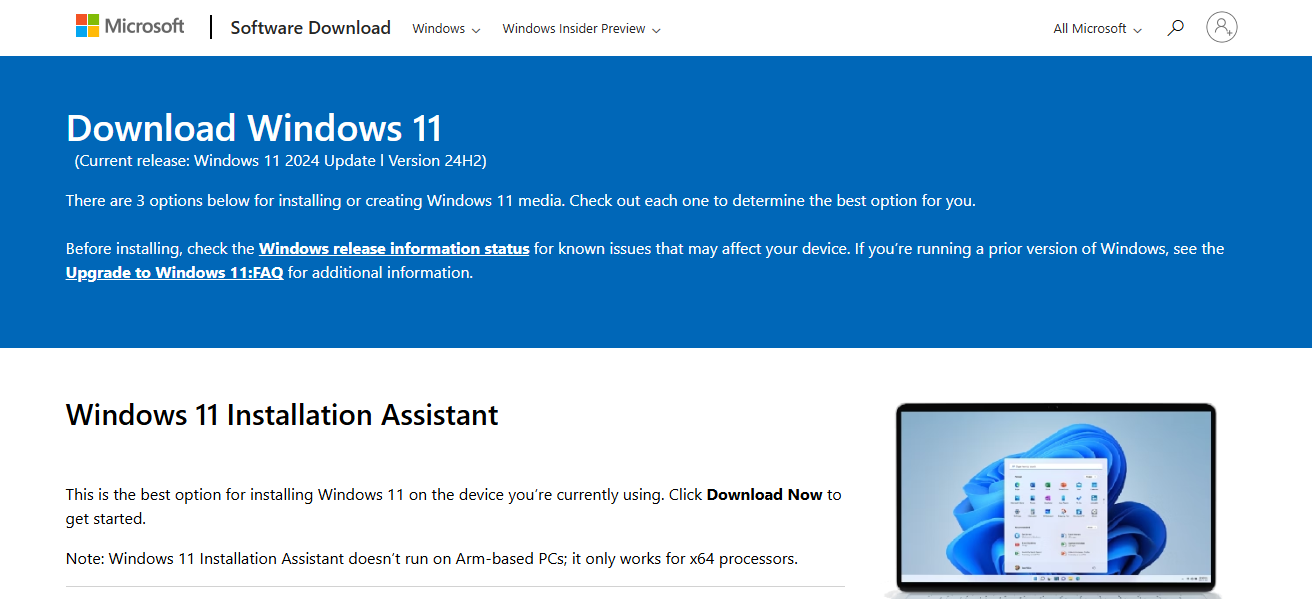
How To Troubleshoot Software Issues

Step-by-Step Guide

1. Identify The Problem

  • Record details of any relevant error messages or codes.
  • Note the exact timing relating to the issue (for example, during startup, while opening a specific program).
  • Consider: Was it triggered by an update or installation?

2. Restart Your PC

  • Instant fixes are often achieved through a simple restart which clears processes and memory. In this case, just turning your computer off and on again might solve the problem temporarily—so give that a shot first!

3. Use Windows Troubleshoot

  • Navigate to Settings > System > Troubleshoot > Other troubleshooters
  • Select the most applicable troubleshooter (Internet Connections, Windows Update, Program Compatibility…).
  • Click next for further instructions and proceed accordingly to all steps indicated.

4. Check for Available Updates

  • Go to Settings and select Windows Update.
  • Any pending updates shall be applied for windows and drivers also.

5: Uninstall Then Reinstall the Problematic Software Ended Up Being Easier Than I Thought!

  • Within ‘Settings,’ navigate to ‘Apps’ then click on ‘Installed Apps.’
  • Search for your targeted software and click the three dots next to it then hit uninstall.
  • Now go back online and reinstall it from its official site so it’s updated!

6 Use System File Checker Window Will Pop Up

Open Command Prompt as Administrator in order to use system file checker

  • Type: sfc /scannow and hit Enter.
  • This scans for and repairs any corrupted system files.

7. Utilize System Restore (if applicable)

  • Look up “Create a restore point” in the Start menu.
  • Click on System Restore, then select a restore point prior to when the problem started.
  • Proceed with the instructions given to restore your system.

8. Check Compatibility Mode

  • Access program icon Properties via right-click, go to Compatibility Tab.
  • Tick “Run this program in compatibility mode” and pick an older Windows version.

9. Get Help

  • Visit Microsoft’s support websites or community forums.
  • Provide detailed info like error code, software version, and steps taken to the vendor directly if you need specialized software support.

Why does restarting fix Many Software Issues?

Clears Memory (RAM)

  • Programs often leave residual data in memory, even after they are closed off. Restarting the computer gives a reset to the RAM on the system.

Stops Background Processes

  • Some applications or services may create processes that run behind the scenes and interfere with other activities. A restart shuts down all non-essential background processes, allowing only critical ones to run.

Releases System Resources

  • Applications that are buggy or overloaded can use resources such as CPU, disk and memory. Restarting will free all these resources resulting in better productivity.

Reloads Drivers and Services

  • Certain device drivers as well as system services can suffer glitches from improper reloading after a reboot which can cause strange behavior from hardware or software, but reboots tend to fix this odd behavior by resetting reload windows without proper restarts .

Common Software Issues and Solutions

Application Crashes or Freezing

An application stops responding due to bugs, out of memory errors, corrupted files and fractures in data packets.

Solution: Restart, update or reinstall the app.

- Advertisement -

Installation Failures

Missing permissions, fragmented installer files, or incompatible system requirements can prevent a user from installing new software on their device.

Solution: Check if enough storage is available and/or run as administrator.

Performance Lags or Slow Response

A slow software response can be attributed to excessive CPU strain due to memory leaks among background apps vying for resources.

- Advertisement -

Solution: Close unused apps together with restarting the system will often resolve such issues. Consider upgrading the RAM if problems persist.

Network Connectivity Issues

These include firewall blocks, DNS errors and unstable Wi-Fi preventing proper internet access/software interaction online.

Solution: Restart router, disable firewall temporarily and/or change DNS settings as required until stable connectivity is provided.

Compatibility Errors

Outdated versions of an operating system (OS) installed may lead to programs ceasing to operate properly altogether. Hardware version differences compound these issues further after running into mismatch conflicts

Solution: Install an appropriate alternative manually utilizing compatibility mode alongside removal via standard methods listed above.

Advanced Troubleshooting Tips

  • Safe Mode or Clean Boot Launching Windows in lower driver mode identifies conflicting software or startup programs linked to crashes and conflicts.

    System Restore or Rollback Revert your computer back to well-functioning prior date checkpoints without damaging your personal data like pictures or documents.

    Using Command-Line Tools or Task Manager Actively monitor processes using Task Manager, CMD, PowerShell, and manage unresponsive apps to repair issues at system level.

    Checking for Malware or Corrupted Files Perform scans with anti-virus software along with SFC and DISM commands to restore broken, missing, altered system files and malware.

Conclusion

To wrap up this section, it is notable that problems with software systems demand a great deal of scrutiny and troubleshooting, including being methodical with the steps taken.

It will be noticed that simply pin-pointing the issue, taking some initial actions, and using basic system utilities can resolve most concerns without much effort.

More stubborn issues may require more sophisticated strategies or even outside assistance. Regular updates coupled with routine maintenance allow smooth function by preventing common glitches systems.

FAQ

What is software troubleshooting?

It’s the process of diagnosing and resolving problems within a software program or system to restore normal functionality.

Why does restarting fix many software issues?

Restarting clears memory, resets background processes, and reloads system files, often resolving temporary glitches or resource conflicts.

What if the program is crashing or freezing?

Try restarting it, updating the app, running it in compatibility mode, or reinstalling it if needed.

⚠

Editorial Standards & Risk Disclosure

✅ Reviewed by the CoinWorldStory Editorial Team

This article is published for informational and educational purposes only and is not financial, investment, legal, or tax advice. Cryptocurrency, forex, and related markets are highly volatile — never invest more than you can afford to lose, and always do your own research before acting on anything you read here. Some links on this page may be affiliate or sponsored placements; where that's the case, it's disclosed, and it never changes the accuracy of our reporting. All content is researched and reviewed under our Editorial Policy.

Email [email protected] Report an Issue / Contact Us →
Share This Article
Facebook Flipboard Pinterest Whatsapp Whatsapp LinkedIn Tumblr Reddit VKontakte Telegram Threads Bluesky Email Copy Link Print
nexo banner

Latest Press Release

PR 1785939515dNMTOKYCqN
Carbon Launches TradFi-Native On-Chain Derivatives Venue With 950+ Markets in One Account
Press Releases
Blockchain Life Returns to Dubai — Featuring the Debut of AI Future!
Press Releases
Martin 4 1785940289jbfgNLvCeZ
ChangeNOW Brings Martin Masser Into Its Crypto Super App
Press Releases
Indonesia Blockchain Week (IDBW) 2026 Flags RWA Tokenization
Indonesia Blockchain Week (IDBW) 2026 Flags RWA Tokenization and High-Level Enterprise Networking as Major Business Priorities
Press Releases
TOP CRYPTO EXCHANGES
Best Crypto Exchanges
  • Kraken Exchange Logo
    Kraken
    Secure Trading
    Visit
  • Bybit Exchange Logo
    Bybit
    Low Fees
    Visit
  • HTX Exchange Logo
    HTX
    Global Exchange
    Visit
  • CoinSwitch Exchange Logo
    CoinSwitch
    Easy INR Access
    Visit
  • Poloniex Exchange Logo
    Poloniex
    Altcoin Markets
    Visit
TOP CRYPTO TOOLS
Best Crypto Tools
  • TradingView Logo
    TradingView
    Charts & Analysis
    Visit
  • CoinGlass Logo
    CoinGlass
    Liquidation Data
    Visit
  • CoinMarketCap Logo
    CoinMarketCap
    Market Tracking
    Visit
  • DexScreener Logo
    DexScreener
    DEX Analytics
    Visit
  • Arkham Intelligence Logo
    Arkham
    Wallet Tracking
    Visit
TOP CRYPTO CASINOS
Best Crypto Casinos
  • Roobet Casino Logo
    Roobet
    Popular Casino
    Visit
  • Stake Casino Logo
    Stake
    Top Sportsbook
    Visit
  • BC.Game Casino Logo
    BC.Game
    Crypto Friendly
    Visit
  • Rollbit Casino Logo
    Rollbit
    Casino + Trading
    Visit
  • Duelbits Casino Logo
    Duelbits
    Instant Withdrawals
    Visit

Coinworldstory Ads

You Might Also Like ↷

10 Best Data Governance Tools For Better Data Management In 2026

10 Best Data Governance Tools For Better Data Management In 2026

30/07/2026
10 Best Compliance Management Platforms for Businesses in 2026

10 Best Compliance Management Platforms for Businesses in 2026

30/07/2026
10 Best Financial Planning & Analysis Software for 2026

10 Best Financial Planning & Analysis Software for 2026

30/07/2026
10 Best Master Data Management (MDM) Software In 2026

10 Best Master Data Management (MDM) Software In 2026

30/07/2026
- Advertisement -
bybit banner for cws
  • Bug Bounty
  • System Status
  • Crypto Regulations Worldwide
  • Best Crypto Prediction Markets
  • 300+ Best Crypto Tools
  • Best Crypto Lawyers & Law Firm Directory
  • Best Crypto Exchanges List in 2026
  • Frequently Asked Questions (FAQ)
  • Best Crypto Wallets List In 2026
  • Best Crypto Casino List
  • CoinWorldStory Media Kit

CoinWorldStory is a leading digital media platform covering cryptocurrency, AI, technology, software, and Web3. We deliver the latest news, unbiased reviews, expert guides, product comparisons, and industry insights to help readers make informed decisions. Whether you’re exploring blockchain, discovering AI tools, comparing software, or staying updated on emerging technologies, CoinWorldStory provides trusted content for enthusiasts, professionals, and businesses worldwide.

coinworldstory logo coinworldstory logo
Hi, welcome to coinworldstory.com
CoinWorldStory mascot dog running
Based in 🇨🇭 Switzerland Office in 🇨🇦 Canada Office in 🇦🇪 UAE

In pursuit of global prosperity. We stand for humanity — Stop War. Support All The World for Peace.

190+ Countries Served
25,000+ Topics Covered
14,523 Live Readers Now

Global Readership

🇺🇸 USA 🇬🇧 UK 🇨🇭 Switzerland 🇦🇪 UAE 🇯🇵 Japan 🇨🇦 Canada 🇩🇪 Germany 🇸🇬 Singapore
Editorial & Support [email protected]
Advertising & Partnerships [email protected]
Contact Us On Telegram @coinworldstoryweb
Google E-E-A-T ISO Certified Est. 2016 SSL Secured GDPR Compliant

Disclaimer

CoinWorldStory is an independent review and comparison platform for crypto exchanges, prop firms, brokers, and gaming sites. We are not financial advisors. All trading and investing involve significant risk, and past performance does not guarantee future results. Some links on our site are affiliate links, and we may receive a commission at no extra cost to you. Please conduct your own research (DYOR) and consult a licensed financial professional before making any investment decisions.

© 2016 — 2026 CoinWorldStory. All Rights Reserved.

  • ADVERTISEMENT
  • MEDIA KIT
  • CONTACT
  • SUBMIT PR
  • GUEST POST
  • ABOUT US
  • TEAM
  • DMCA
  • DISCLAIMER
  • PRIVACY POLICY
  • MORE
CoinworldstoryCoinworldstory