Kraken Crypto Exchange Banner Ad
Bitcoin icon
BTC $65,000.00 +0.00%
Ethereum icon
ETH $3,500.00 +0.00%
XRP icon
XRP $0.6000 +0.00%
BNB icon
BNB $600.00 +0.00%
Solana icon
SOL $150.00 +0.00%
Dogecoin icon
DOGE $0.1500 +0.00%
Cardano icon
ADA $0.4000 +0.00%
TRON icon
TRX $0.1200 +0.00%
Chainlink icon
LINK $15.00 +0.00%
Avalanche icon
AVAX $35.00 +0.00%
By using this site, you agree to the Privacy Policy and Terms of Use.
Accept
  • ADVERTISEMENT
  • MEDIA KIT
  • CONTACT
  • SUBMIT PR
  • GUEST POST
  • ABOUT US
  • TEAM
  • DMCA
  • DISCLAIMER
  • PRIVACY POLICY
  • MORE
    • llms.txt
    • Newsletter
    • Official Verify
    • Editorial Policy
    • Term Of Use
    • SITEMAP
Reading: How To Store Btc On A Lightning-Enabled Hardware Wallet | Secure & Fast
coinworldstory logo coinworldstory logo
  • HOME
  • CRYPTO
    • AI
    • BOTS
    • ICO
    • AIRDROP
      • Featured Airdrops
    • Price Prediction
    • EXCHANGE
      • Best Centralized Exchange List 2026
      • Best Decentralized Exchange List 2025
    • ALTCOIN
    • Alt Coin Signal
    • Crypto Analysis
    • Bitcoin Loan
    • Bitcoin Mining
    • WALLETPRO
  • PR
    PR
    If You Looking For Submit Cryptocurrency Press Releases Than Coinworldstory Is Best Choice For Crypto Press Release Submission
    Show More
    Top News
    cryptomonsters12
    CryptoMonsters World – The New Litecoin Game
    01/03/2021
    Mainston Revolutionizes The World Of Marketplaces.
    Mainston Revolutionizes The World Of Marketplaces.
    14/04/2024
    Ethernity Chain to Drop NFT of NAS’s Performance in South Africa on the 20th Anniversary of the end of Apartheid
    14/04/2024
    Latest News
    Same Election Question, Two Different Odds: Predictions.io Launches Free Cross-Venue Comparison Tools
    28/08/2026
    YZi Labs Backs TermMax to Advance On-Chain Bond Market Infrastructure
    27/08/2026
    Rent TRON Energy and Reduce USDT Fees : TronBid Expands Marketplace
    27/08/2026
    Aligned Launches $ALIGN, the Native Token of Its Full Ethereum Stack
    21/08/2026
  • NEWS
    • Mining
    • Altcoins
    • Ban
    • BANKING/FINANCE NEWS
    • Bitcoin
    • Blockchain
    • CRYPTO CRIME
    • Ethereum
    • Exchange News
    • Government News
    NEWSShow More
    Breaking: Bitcoin Tops $78K as Bessent Eyes $1T Buyback
    Breaking: Bitcoin Tops $78K as Bessent Eyes $1T Buyback
    24/08/2026
    Bitget Restricts HTX, EXMO & More Amid Sanctions Crackdown
    Bitget Restricts HTX, EXMO & More Amid Sanctions Crackdown
    16/08/2026
    10 Best High Rewards Crypto Platforms for Maximum Earnings
    10 Best Institutional Trading Technology Platforms in 2026
    31/07/2026
    10 Hidden Liquidity Features Modern Brokers Secretly Use
    10 Hidden Liquidity Features Modern Brokers Secretly Use
    29/05/2026
    10 Apps That Show What You Should Have Done Instead
    10 Apps That Show What You Should Have Done Instead
    29/05/2026
  • MORE
    • Guide
    • Only Best
    • Off Topic
    • Best Affiliate Marketing
    • Best Affiliate Programs
    • BOTS
    • Trusted Currency Exchanger Platform
    • Blockchain Games
    • Metaverse Review : Best Metaverse Program Review
    • Online Survey
    • Payment Platform
  • VPN
  • List
    • Best Crypto Casinos In 2026
    • Best Crypto Wallets List 2026
    • Best Crypto Exchanges List 2026
    • Best Crypto Lawyers & Farm
    • Best Crypto Tools List 2026
    • Crypto Regulations Worldwide 2026
    • Best Crypto Prediction Markets
  • Contact Us
  • FAQ
Reading: How To Store Btc On A Lightning-Enabled Hardware Wallet | Secure & Fast
Font ResizerAa
CoinworldstoryCoinworldstory
  • ADVERTISEMENT
  • MEDIA KIT
  • CONTACT
  • SUBMIT PR
  • GUEST POST
  • ABOUT US
  • TEAM
  • DMCA
  • DISCLAIMER
  • PRIVACY POLICY
  • MORE
Search
  • HOME
  • CRYPTO
    • AI
    • BOTS
    • ICO
    • AIRDROP
    • Price Prediction
    • EXCHANGE
    • ALTCOIN
    • Alt Coin Signal
    • Crypto Analysis
    • Bitcoin Loan
    • Bitcoin Mining
    • WALLETPRO
  • PR
  • NEWS
    • Mining
    • Altcoins
    • Ban
    • BANKING/FINANCE NEWS
    • Bitcoin
    • Blockchain
    • CRYPTO CRIME
    • Ethereum
    • Exchange News
    • Government News
  • MORE
    • Guide
    • Only Best
    • Off Topic
    • Best Affiliate Marketing
    • Best Affiliate Programs
    • BOTS
    • Trusted Currency Exchanger Platform
    • Blockchain Games
    • Metaverse Review : Best Metaverse Program Review
    • Online Survey
    • Payment Platform
  • VPN
  • List
    • Best Crypto Casinos In 2026
    • Best Crypto Wallets List 2026
    • Best Crypto Exchanges List 2026
    • Best Crypto Lawyers & Farm
    • Best Crypto Tools List 2026
    • Crypto Regulations Worldwide 2026
    • Best Crypto Prediction Markets
  • Contact Us
  • FAQ

Trending →

10 Crypto Loan Cards With No Origination Fee in 2026

By Elon Jack
29/08/2026

10 Crypto Casinos With High-Roller Withdrawal Support

By Elon Jack
29/08/2026

10 Forex Brokers With Micro-Lots & Crypto Deposits

By Elon Jack
28/08/2026

10 Crypto Casinos With Auditable Fair Seeds

By Coinworldstory
28/08/2026

10 VPNs With No‑Logs Policies for Traders

By Coinworldstory
28/08/2026
Follow US
Email - support@coinworldstory.com

Home » How To Store Btc On A Lightning-Enabled Hardware Wallet | Secure & Fast

Wallets

How To Store Btc On A Lightning-Enabled Hardware Wallet | Secure & Fast

Henary Uttam
Last updated: 27/09/2025 6:44 PM
By Henary Uttam
Share
11 Min Read
How To Store Btc On A Lightning-Enabled Hardware Wallet | Secure & Fast
SHARE

In this article, I will explain how to keep BTC on a Lightning-enabled hardware wallet, integrating the benefits of cold storage with the speed and low costs associated with the Lightning Network.

Contents
  • What Is a Lightning-Enabled Hardware Wallet?
  • How To Store Btc On A Lightning-Enabled Hardware Wallet
    • Step 1: Prepare Your Blockstream Jade
    • Step 2: Download and Create Your Wallet on BlueWallet
    • Step 3: Link Jade to BlueWallet for Bitcoin Off-Chain Storage
    • Step 4: Load Funds to Your Jade Wallet
    • Step 5: Opening a Lightning Channel (Optional but Recommended)
    • Step 6: BTC Transactions via Lightning Network
    • Step 7: Backup and Security Measures
  • Preparing Your Btc On A Lightning-Enabled Hardware Wallet
  • Best Practices and Tips Store BTC on a Lightning-Enabled Hardware Wallet
  • Is storing BTC on Lightning as secure as on-chain storage?
  • Troubleshooting Common Issues
  • Future of Lightning Hardware Wallets
  • Pros And Cons
  • Conclusion
  • FAQ
    • Can I use Lightning on any hardware wallet?
    • How do I fund a Lightning wallet using my hardware wallet?
    • Do I need to run my own Lightning node?

This article is for anyone interested in Bitcoin. I will show you how to improve your self-custody methods step by step using a hardware wallet with Lightning integration.

What Is a Lightning-Enabled Hardware Wallet?

A hardware wallet that supports Lightning transactions is a Bitcoin wallet which allows Bitcoin to be locked up securely while also enabling transactions on the Lightning Network. The Lightning Network is a second layer network on Bitcoin that allows for fast, cheap, and scalable payments.

With Integrated Lightning support, these wallets offer the best of both worlds by allowing for remote cold storage to hold Bitcoin safely while also permitting sending and receiving Bitcoin as needed.

- Advertisement -

For a user who needs both levels of safety and convenience, a Lightning-enabled hardware wallet is critical for modern self-custody of Bitcoin and managing both large and small transactions.

How To Store Btc On A Lightning-Enabled Hardware Wallet

Step 1: Prepare Your Blockstream Jade

  • Get your Blockstream Jade and complete the unboxing and initial setup.
  • Make sure to write down your 24-word seed phrase and keep it stored securely offline.
  • Update your firmware if needed using Blockstream Green desktop/mobile app.

Step 2: Download and Create Your Wallet on BlueWallet
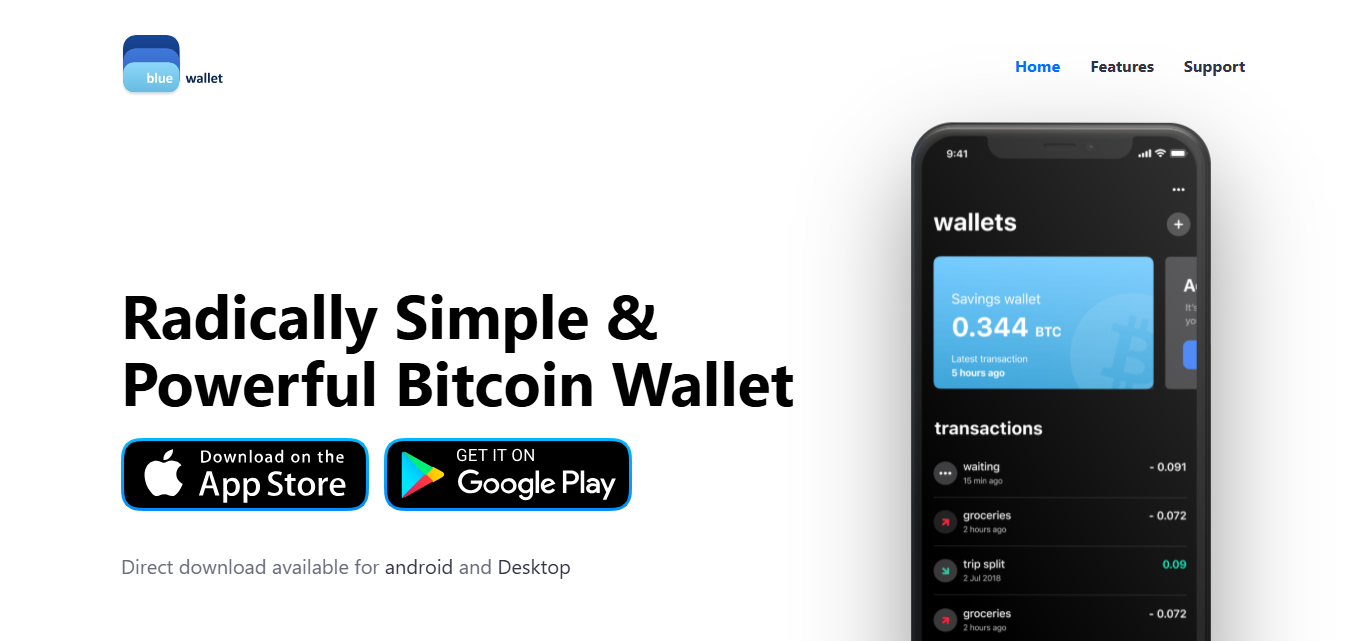
Step 2: Download and Create Your Wallet on BlueWallet
  • Get the app from the BlueWallet website (available on iOS and Android).
  • Launch the app and establish a Lightning Wallet.
  • It is custodial by default. To convert it to non-custodial, link it to your own LNDHub server or a trusted public LNDHub.

Step 3: Link Jade to BlueWallet for Bitcoin Off-Chain Storage

  • Make a new Bitcoin wallet in BlueWallet and add your Jade wallet in watch-only mode via XPUB.
  • This way, you can see the balances and transactions from Jade without needing to give out any private keys.

Step 4: Load Funds to Your Jade Wallet

  • Receive BTC to your on-chain address on the Jade (either through BlueWallet or Blockstream Green).
  • Make sure to wait for the network confirmations.

Step 5: Opening a Lightning Channel (Optional but Recommended)

  • Achieve full non-custodial status by doing the following:
    • Create your own Lightning node such as Umbrel or RaspiBlitz.
    • Connect with Jade using Electrum or Sparrow.
    • Open a Lightning channel with your on-chain wallet and fund it from your node.

Step 6: BTC Transactions via Lightning Network

  • With BlueWallet, you can scan invoices, tip, or accept payments through the Lightning tab.
  • Payments will be made through the Lightning Network using funds from your channels or custodial balance.

Step 7: Backup and Security Measures

  • Make sure to keep Jade’s on-chain BTC seed phrase and Lightning channel backup file safe.
  • Watchtower services can also help to monitor and mitigate the risk of malicious channel closes.

Preparing Your Btc On A Lightning-Enabled Hardware Wallet

Select Ideal Wallet

Choose a hardware wallet with Lightning support, like Blockstream Jade or Passport with integrated wallets.

Update Firmware

Check that the device has the latest secure firmware to enable Lightning compatibility.

- Advertisement -

Install Companion Application

Manage your Lightning channels and on-chain BTC with BlueWallet, Zeus, or Electrum.

Secure Your Recovery Phrase

- Advertisement -

Recovery phrases can be secured as 12/24 word phrases, but should never be stored digitally.

Fund Your On-Chain Wallet

Purchase BTC and send it directly to your hardware wallet’s on-chain address to set up Lightning channels.

Optional: Set Up Your Own Lightning Node

If you want complete control, set up your own node with Umbrel to open non-custodial channels.

Link Wallet And App

Manage your payment transactions through the Lightning compatible application.

Store Channel Data Securely

Save your Static Channel Backup file in a secure location after backing up.

Best Practices and Tips Store BTC on a Lightning-Enabled Hardware Wallet

Avoid Custodial Lightning Services Turn Off Non-Custodial Lightning Channels If Possible: As much as possible, avoid custodial Lightning Services to retain full control of your funds.

Remember to Always Backup Your Seed and Channel Wording: Save your hardware wallet’s seed phrase in a safe offline location.

If you are using your own Lightning node, backup your Static Channel Backup (SCB) file, which is critical for recovery on Lightning.

Grasp Channel Liquidity: Make sure that there is balanced liquidity on both sides (inbound + outbound) to facilitate smooth transactions. Improve reliability with services such as Loop or dual funded channels.

Distinguish Between Spending and Savings: Lightning is to be utilized for day-to-day expenditure. Keep long-term savings in cold storage (on-chain BTC).

Refresh liquidity and reduce risk by Periodically Closing and Reopening Channels. This refreshes liquidity and reduces risk from inactive or unresponsive peers.

Is storing BTC on Lightning as secure as on-chain storage?

Storing BTC on the Lightning Network is less secure than on-chain storage, especially for long-term storage. On-chain Bitcoin in a hardware wallet is secure through cold storage and can be recovered with a seed phrase.

In contrast, Lightning has to be actively managed which includes backing up channel data (Static Channel Backups), keeping the node online, and using watchtowers for BTC security.

Lightning is best for small, quick, and frequent transactions, but the added complexity creates more failure risks. For optimal security, most BTC should be stored on-chain while Lightning can be used for small everyday expenses.

Troubleshooting Common Issues

Payment Stuck or Fails: Make sure your Lightning channel has sufficient outbound liquidity. Get routed differently, or wait and retry.

Can’t Open or Close Channel: Make sure you have enough BTC on-chain for fees. Make sure the mempool isn’t congested; use higher fees.

Node Won’t Connect to Wallet: Check the network configuration, Tor (if used), and node status. Restart the devices and perform manual reconnects.

Unable to Access Funds in Lightning Wallet: Use Static Channel Backup (SCB) along with the seed phrase to restore. Without SCB, the funds in Lightning wallet may be lost permanently.

Balance Shows Incorrectly: Resync your node or refresh the app. Look for closed or pending channels.

Future of Lightning Hardware Wallets

Native Lightning Support

The use of nodes and external applications for Lightning will no longer be a challenge, as hardware wallets will support it directly.

Simplified Channel Management

User complexity will be reduced with automatic channel opening, closing, and rebalancing.

Taproot & PTLC Integration

Advanced Bitcoin features offer better privacy and efficiency which enhances smart contract functionality.

Seamless Mobile Integration

Syncing with mobile applications will enable real-time Lightning access and control over wallets.

Watchtower & Backup Services

Frauds targeted Lightning funds will get easier Lightning fund recovery, thus built-in protection.

Improved User Interfaces

Managing on-chain and Lightning BTC will be made easy and more intuitive, improving the overall experience for users.

Modular Wallet Systems

Users will be able to combine Lightning, on-chain, and stablecoins in one secure device.

Increased Interoperability

Enhanced cross-app, platform, and Lightning service integration.

Offline Lightning Support (Experimental)

Devices of the future may offer some limited Lightning capabilities without constant internet connection.

Broader Adoption and Ecosystem Growth

As Lightning services become more mainstream, hardware wallets will be vital for secure, day-to-day Bitcoin transactions.

Pros And Cons

ProsCons
High Security – Private keys stay offline in the hardware walletComplex Setup – Requires technical knowledge, especially with Lightning
Fast, Low-Fee Transactions via Lightning NetworkChannel Management Needed – Users must understand liquidity and routing
Dual Use – Store on-chain savings and spend via LightningBackup Complexity – Must back up both seed phrase and channel data
Mobile Integration – Works with apps like BlueWallet, ZeusRequires External Apps – Most devices need companion software or nodes
Self-Custody – Full control of your BTC Limited Lightning Support – Not all hardware wallets support Lightning yet
Spending Flexibility – Ideal for microtransactions and daily useFrequent Maintenance – Channels may need to be closed, reopened, or rebalanced
Future-Ready – Supports evolving Bitcoin and Lightning featuresStill Evolving – Lightning on hardware wallets is relatively new and improving

Conclusion

To sum up, having a BTC wallet that is both hardware-enabled and Lightning-supported ensures top level security with cold storage as well as quick and inexpensive transactions. Although the initial setup may require some technical know-how, it gives users complete control over their Bitcoin.

For sophisticated Bitcoin owners, combining on-chain savings with Lightning expenses makes it a great option when supreme confidentiality, efficiency, and self-custody for many years to come is desired.

FAQ

Can I use Lightning on any hardware wallet?

No. Only select wallets like Blockstream Jade or Passport (with apps like Zeus or LNDHub) support Lightning, often via companion software or external nodes.

How do I fund a Lightning wallet using my hardware wallet?

Send BTC to your wallet’s on-chain address. Then, use a connected app to open a Lightning channel with part of that balance.

Do I need to run my own Lightning node?

It’s optional. You can use third-party services (custodial) or run your own node (non-custodial) for full control and privacy.


⚠

Editorial Standards & Risk Disclosure

✅ Reviewed by the CoinWorldStory Editorial Team

This article is published for informational and educational purposes only and is not financial, investment, legal, or tax advice. Cryptocurrency, forex, and related markets are highly volatile — never invest more than you can afford to lose, and always do your own research before acting on anything you read here. Some links on this page may be affiliate or sponsored placements; where that's the case, it's disclosed, and it never changes the accuracy of our reporting. All content is researched and reviewed under our Editorial Policy.

Email support@coinworldstory.com Report an Issue / Contact Us →
Share This Article
Facebook Flipboard Pinterest Whatsapp Whatsapp LinkedIn Tumblr Reddit VKontakte Telegram Threads Bluesky Email Copy Link Print
nexo banner

Latest Press Release

Frame 2043684091 1787918001OTVbnUd9Ld
Same Election Question, Two Different Odds: Predictions.io Launches Free Cross-Venue Comparison Tools
Press Releases
YZi Labs Backs TermMax to Advance On
YZi Labs Backs TermMax to Advance On-Chain Bond Market Infrastructure
Press Releases
Rent TRON Energy and Reduce USDT Fees
Rent TRON Energy and Reduce USDT Fees : TronBid Expands Marketplace
Press Releases
Aligned Launches $ALIGN, the Native Token of Its Full Ethereum Stack
Press Releases
TOP CRYPTO EXCHANGES
Best Crypto Exchanges
  • Kraken Exchange Logo
    Kraken
    Secure Trading
    Visit
  • Bybit Exchange Logo
    Bybit
    Low Fees
    Visit
  • HTX Exchange Logo
    HTX
    Global Exchange
    Visit
  • CoinSwitch Exchange Logo
    CoinSwitch
    Easy INR Access
    Visit
  • Poloniex Exchange Logo
    Poloniex
    Altcoin Markets
    Visit
TOP CRYPTO TOOLS
Best Crypto Tools
  • TradingView Logo
    TradingView
    Charts & Analysis
    Visit
  • CoinGlass Logo
    CoinGlass
    Liquidation Data
    Visit
  • CoinMarketCap Logo
    CoinMarketCap
    Market Tracking
    Visit
  • DexScreener Logo
    DexScreener
    DEX Analytics
    Visit
  • Arkham Intelligence Logo
    Arkham
    Wallet Tracking
    Visit
TOP CRYPTO CASINOS
Best Crypto Casinos
  • Roobet Casino Logo
    Roobet
    Popular Casino
    Visit
  • Stake Casino Logo
    Stake
    Top Sportsbook
    Visit
  • BC.Game Casino Logo
    BC.Game
    Crypto Friendly
    Visit
  • Rollbit Casino Logo
    Rollbit
    Casino + Trading
    Visit
  • Duelbits Casino Logo
    Duelbits
    Instant Withdrawals
    Visit

Coinworldstory Ads

You Might Also Like ↷

10 Best AI Wallets In 2026 for Smart Crypto Management

10 Best AI Wallets In 2026 for Smart Crypto Management

17/07/2026
17 Best Cold Storage Wallets for The Next Crypto Bull Run

17 Best Cold Storage Wallets for The Next Crypto Bull Run

29/05/2026
Top 10 Non-Custodial Wallets for Secure Crypto Control

Top 10 Non-Custodial Wallets for Secure Crypto Control

29/05/2026
13 Best Multi-Sig Wallets For Family & Business Crypto

13 Best Multi-Sig Wallets For Family & Business Crypto

29/05/2026
- Advertisement -
bybit banner for cws
  • Bug Bounty
  • System Status
  • Crypto Regulations Worldwide
  • Best Crypto Prediction Markets
  • 300+ Best Crypto Tools
  • Best Crypto Lawyers & Law Firm Directory
  • Best Crypto Exchanges List in 2026
  • Frequently Asked Questions (FAQ)
  • Best Crypto Wallets List In 2026
  • Best Crypto Casino List
  • CoinWorldStory Media Kit

CoinWorldStory is a leading digital media platform covering cryptocurrency, AI, technology, software, and Web3. We deliver the latest news, unbiased reviews, expert guides, product comparisons, and industry insights to help readers make informed decisions. Whether you’re exploring blockchain, discovering AI tools, comparing software, or staying updated on emerging technologies, CoinWorldStory provides trusted content for enthusiasts, professionals, and businesses worldwide.

coinworldstory logo coinworldstory logo
Hi, welcome to coinworldstory.com
CoinWorldStory mascot dog running
Based in 🇨🇭 Switzerland Office in 🇨🇦 Canada Office in 🇦🇪 UAE

In pursuit of global prosperity. We stand for humanity — Stop War. Support All The World for Peace.

190+ Countries Served
25,000+ Topics Covered
14,523 Live Readers Now

Global Readership

🇺🇸 USA 🇬🇧 UK 🇨🇭 Switzerland 🇦🇪 UAE 🇯🇵 Japan 🇨🇦 Canada 🇩🇪 Germany 🇸🇬 Singapore
Editorial & Support support@coinworldstory.com
Advertising & Partnerships adv@coinworldstory.com
Contact Us On Telegram @coinworldstoryweb
Google E-E-A-T ISO Certified Est. 2016 SSL Secured GDPR Compliant

Disclaimer

CoinWorldStory is an independent review and comparison platform for crypto exchanges, prop firms, brokers, and gaming sites. We are not financial advisors. All trading and investing involve significant risk, and past performance does not guarantee future results. Some links on our site are affiliate links, and we may receive a commission at no extra cost to you. Please conduct your own research (DYOR) and consult a licensed financial professional before making any investment decisions.

© 2016 — 2026 CoinWorldStory. All Rights Reserved.

  • ADVERTISEMENT
  • MEDIA KIT
  • CONTACT
  • SUBMIT PR
  • GUEST POST
  • ABOUT US
  • TEAM
  • DMCA
  • DISCLAIMER
  • PRIVACY POLICY
  • MORE
CoinworldstoryCoinworldstory