Kraken Crypto Exchange Banner Ad
Bitcoin icon
BTC $65,000.00 +0.00%
Ethereum icon
ETH $3,500.00 +0.00%
XRP icon
XRP $0.6000 +0.00%
BNB icon
BNB $600.00 +0.00%
Solana icon
SOL $150.00 +0.00%
Dogecoin icon
DOGE $0.1500 +0.00%
Cardano icon
ADA $0.4000 +0.00%
TRON icon
TRX $0.1200 +0.00%
Chainlink icon
LINK $15.00 +0.00%
Avalanche icon
AVAX $35.00 +0.00%
By using this site, you agree to the Privacy Policy and Terms of Use.
Accept
  • ADVERTISEMENT
  • MEDIA KIT
  • CONTACT
  • SUBMIT PR
  • GUEST POST
  • ABOUT US
  • TEAM
  • DMCA
  • DISCLAIMER
  • PRIVACY POLICY
  • MORE
    • llms.txt
    • Newsletter
    • Official Verify
    • Editorial Policy
    • Term Of Use
    • SITEMAP
Reading: How To Download Windows Notepad | Easy Guide
coinworldstory logo coinworldstory logo
  • HOME
  • CRYPTO
    • AI
    • BOTS
    • ICO
    • AIRDROP
      • Featured Airdrops
    • Price Prediction
    • EXCHANGE
      • Best Centralized Exchange List 2026
      • Best Decentralized Exchange List 2025
    • ALTCOIN
    • Alt Coin Signal
    • Crypto Analysis
    • Bitcoin Loan
    • Bitcoin Mining
    • WALLETPRO
  • PR
    PR
    If You Looking For Submit Cryptocurrency Press Releases Than Coinworldstory Is Best Choice For Crypto Press Release Submission
    Show More
    Top News
    Press Banner2 1782402963SJYV29GylC
    The DATA Foundation Launches to Tackle AI’s Multi-Billion Dollar Training Data Bottleneck
    26/06/2026
    WalletBouncer Press Release
    WalletBouncer Announce Bitcoin Wallet Monitoring Service
    14/06/2023
    ThunderBolt, Efficiency Linked To The TBC Token
    ThunderBolt, Efficiency Linked To The TBC Token
    05/08/2023
    Latest News
    Aligned Launches $ALIGN, the Native Token of Its Full Ethereum Stack
    21/08/2026
    Finassets Crypto Payment Gateway Launches USDC Payment Support on Solana
    21/08/2026
    BYDFi Joins Coinfest Asia 2026, Connecting with Institutions, Builders and Traders in Bali
    20/08/2026
    VAP Group Announces Global Trading Show, The Most Influential Unified Multi-Asset Trading Show
    17/08/2026
  • NEWS
    • Mining
    • Altcoins
    • Ban
    • BANKING/FINANCE NEWS
    • Bitcoin
    • Blockchain
    • CRYPTO CRIME
    • Ethereum
    • Exchange News
    • Government News
    NEWSShow More
    Bitget Restricts HTX, EXMO & More Amid Sanctions Crackdown
    Bitget Restricts HTX, EXMO & More Amid Sanctions Crackdown
    16/08/2026
    10 Best High Rewards Crypto Platforms for Maximum Earnings
    10 Best Institutional Trading Technology Platforms in 2026
    31/07/2026
    10 Hidden Liquidity Features Modern Brokers Secretly Use
    10 Hidden Liquidity Features Modern Brokers Secretly Use
    29/05/2026
    10 Apps That Show What You Should Have Done Instead
    10 Apps That Show What You Should Have Done Instead
    29/05/2026
    10 Best Crypto Conferences to Attend in 2026
    10 Best Crypto Conferences to Attend in 2026
    29/05/2026
  • MORE
    • Guide
    • Only Best
    • Off Topic
    • Best Affiliate Marketing
    • Best Affiliate Programs
    • BOTS
    • Trusted Currency Exchanger Platform
    • Blockchain Games
    • Metaverse Review : Best Metaverse Program Review
    • Online Survey
    • Payment Platform
  • VPN
  • List
    • Best Crypto Casinos In 2026
    • Best Crypto Wallets List 2026
    • Best Crypto Exchanges List 2026
    • Best Crypto Lawyers & Farm
    • Best Crypto Tools List 2026
    • Crypto Regulations Worldwide 2026
    • Best Crypto Prediction Markets
  • Contact Us
  • FAQ
Reading: How To Download Windows Notepad | Easy Guide
Font ResizerAa
CoinworldstoryCoinworldstory
  • ADVERTISEMENT
  • MEDIA KIT
  • CONTACT
  • SUBMIT PR
  • GUEST POST
  • ABOUT US
  • TEAM
  • DMCA
  • DISCLAIMER
  • PRIVACY POLICY
  • MORE
Search
  • HOME
  • CRYPTO
    • AI
    • BOTS
    • ICO
    • AIRDROP
    • Price Prediction
    • EXCHANGE
    • ALTCOIN
    • Alt Coin Signal
    • Crypto Analysis
    • Bitcoin Loan
    • Bitcoin Mining
    • WALLETPRO
  • PR
  • NEWS
    • Mining
    • Altcoins
    • Ban
    • BANKING/FINANCE NEWS
    • Bitcoin
    • Blockchain
    • CRYPTO CRIME
    • Ethereum
    • Exchange News
    • Government News
  • MORE
    • Guide
    • Only Best
    • Off Topic
    • Best Affiliate Marketing
    • Best Affiliate Programs
    • BOTS
    • Trusted Currency Exchanger Platform
    • Blockchain Games
    • Metaverse Review : Best Metaverse Program Review
    • Online Survey
    • Payment Platform
  • VPN
  • List
    • Best Crypto Casinos In 2026
    • Best Crypto Wallets List 2026
    • Best Crypto Exchanges List 2026
    • Best Crypto Lawyers & Farm
    • Best Crypto Tools List 2026
    • Crypto Regulations Worldwide 2026
    • Best Crypto Prediction Markets
  • Contact Us
  • FAQ

Trending →

10 Crypto Loan Apps – No Credit Check, Instant Payout

By Elon Jack
24/08/2026

10 Best Proof‑of‑Personhood Tools for Web3 Apps

By Cws Team
23/08/2026

10 Crypto Casinos With Same-Day Withdrawal & Zero KYC

By Elon Jack
22/08/2026

10 Prop Firms With No Time Limit & No Trading Days

By Elon Jack
22/08/2026

10 Forex Brokers With Instant USDT Deposits No Bank Delay

By Elon Jack
22/08/2026
Follow US
Email - [email protected]

Home » How To Download Windows Notepad | Easy Guide

Guide & Crypto Education

How To Download Windows Notepad | Easy Guide

Gixona
Last updated: 18/10/2025 4:31 PM
By Gixona
Share
6 Min Read
How To Download Windows Notepad | Easy Guide
SHARE

In this article, I will discuss how to download Windows Notepad. Whether you’re using Windows 10, 11, or an older version, Notepad is an essential text editor.

Contents
  • What Is Windows Notepad?
  • How To Download Windows Notepad
    • Open the Microsoft Store
    • Search for Notepad
    • Locate the App
    • Click Install
    • Launch Notepad
  • Where Is Notepad on My mobile device?
  • Windows Notepad Alternatives
    •  Notepad++
    • Sublime Text
    • Atom
    • Visual Studio Code (VS Code)
    • Notepad2
  • Pros And Cons Windows Notepad
    • Cons:
  • Conclusion

I’ll guide you through the simple steps to install or enable Notepad on your system, ensuring you can quickly access this useful tool for text editing and note-taking.

What Is Windows Notepad?

Windows Notepad is a standard text editor provided in Microsoft Windows for basic usage. It enables users to create, edit, and view text files without any formatting, such as .txt files. For quick notes, coding, or making configuration files, Notepad is super lightweight and fast, thus making it simpler to use.

What Is Windows Notepad?

Notepad does not have features such as advanced spelling check and text formatting but it is still a useful application for people who require a simple text editor. Developers and system admins also prefer using Notepad when editing scripts, configuration files, and logs because of its sheer ease of use.

- Advertisement -

How To Download Windows Notepad

Open the Microsoft Store

Open the Microsoft Store

On your Windows device, look for and start the Microsoft Store app.

Search for Notepad

In the Notepad search box (which is at the top), type in “Notepad.”

Locate the App

Search results will show. Look for “Windows Notepad.”

Click Install

Click the “Install” button to download and install Notepad on your device.

Launch Notepad

After installing, go to the Start menu or search for the word Notepad in the Windows search box.

- Advertisement -

Where Is Notepad on My mobile device?

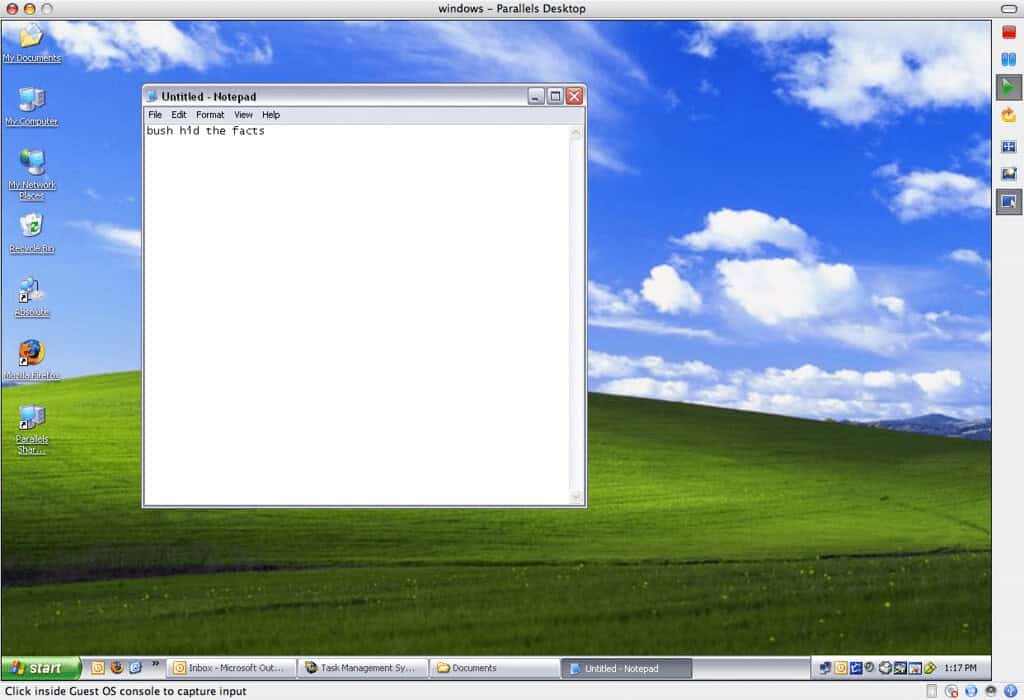
Mobile devices, such as smartphones and tablets, lack a Notepad app. However, iPhones and iPads have the Notes app, which offers basic note-taking capabilities. An equivalent Google Keep is provided on Android devices.
Where Is Notepad on My mobile device?

If you need something that resembles Notepad, the Apple App Store and Google Play Store offer different options, including but not limited to Simple Notepad, JotterPad, or Notepad++ for both platforms.

Windows Notepad Alternatives

 Notepad++
 Notepad++
  • This program is an advanced text editor which can be used for writing codes and general texts.
  • Suggested for Programmers and expert users.

Sublime Text

  • One of the best and fastest text editors with a unique and user friendly graphic interface.
  • Excelling in multi-line editing, And powerful search tends to simplify text editing and coding.

Atom

Atom
  • Atom is completely free to use and can be modified to suit any purpose.
  • Designed for developers, and comes with packages and built in GitHub.

Visual Studio Code (VS Code)

  • This is a free yet powerful editor that is used solely for programming.
  • The editor contains all the required features for programming such as debugging, Git integration and supports other extensions for various programming languages.

Notepad2

  • A simple open source code editor which has the ability to highlight syntax and is lightweight.
  • A somewhat rough interface when compared to Notepad but permits you to manipulate text more freely.

Pros And Cons Windows Notepad

Pros:

- Advertisement -

Speedy and Efficient: Notepad works on any computer, regardless of the power or speed, and starts up in no time making it perfect for text file editing.

Already Exists: Comes as part of Windows software, meaning you do not have to bother getting extra software.

User Friendly: Is easy to use, with no complex buttons or features to make it difficult to use.

Suitable For Minimal Level Work: Great for drafting, taking notes, writing scripts, and performing basic text edits without any concentration hurdles.

Mobility: As it is an elementary software, Notepad launches right away and operates smoothly.

Cons:

Few Functionalities: Does not allow text formatting such as bolding, italics, or selecting font styles making it less ideal for advanced uses.

Does Not Highlight: Scripting and coding is very hard in Notepad as it does not check for highlighting of coding errors, making it unsuitable for anything more than basic text.

Cannot Save Automatically: Forgetting to save a document can be catastrophic as Notepad does not have any form of auto-save.

No Support for Rich Text Formatting: You cannot add hyperlinks or any other formatting option to Notepad, making it very basic.

Specific File Compatibility: Unlike other text editors, it is restricted in its usability as it is only able to save and open text files in .txt format.

Conclusion

To sum it up, downloading Windows Notepad is easy. For Windows 10/11, it is as simple as heading to the Microsoft Store or turning it on through Optional Features.

For older versions, Notepad should already be installed. In any case, Notepad is always a handy tool for simple text editing, and these ways guarantee that you will have access to it whenever you need it.

⚠

Editorial Standards & Risk Disclosure

✅ Reviewed by the CoinWorldStory Editorial Team

This article is published for informational and educational purposes only and is not financial, investment, legal, or tax advice. Cryptocurrency, forex, and related markets are highly volatile — never invest more than you can afford to lose, and always do your own research before acting on anything you read here. Some links on this page may be affiliate or sponsored placements; where that's the case, it's disclosed, and it never changes the accuracy of our reporting. All content is researched and reviewed under our Editorial Policy.

Email [email protected] Report an Issue / Contact Us →
Share This Article
Facebook Flipboard Pinterest Whatsapp Whatsapp LinkedIn Tumblr Reddit VKontakte Telegram Threads Bluesky Email Copy Link Print
nexo banner

Latest Press Release

Aligned Launches $ALIGN, the Native Token of Its Full Ethereum Stack
Press Releases
Solana payment gateway 17872138568ZcLCToMxC
Finassets Crypto Payment Gateway Launches USDC Payment Support on Solana
Press Releases
BYDFi Joins Coinfest Asia 2026 Connecting with Ins 1787212422xM5HD0eVYj
BYDFi Joins Coinfest Asia 2026, Connecting with Institutions, Builders and Traders in Bali
Press Releases
VAP Group Announces Global Trading Show
VAP Group Announces Global Trading Show, The Most Influential Unified Multi-Asset Trading Show
Press Releases
TOP CRYPTO EXCHANGES
Best Crypto Exchanges
  • Kraken Exchange Logo
    Kraken
    Secure Trading
    Visit
  • Bybit Exchange Logo
    Bybit
    Low Fees
    Visit
  • HTX Exchange Logo
    HTX
    Global Exchange
    Visit
  • CoinSwitch Exchange Logo
    CoinSwitch
    Easy INR Access
    Visit
  • Poloniex Exchange Logo
    Poloniex
    Altcoin Markets
    Visit
TOP CRYPTO TOOLS
Best Crypto Tools
  • TradingView Logo
    TradingView
    Charts & Analysis
    Visit
  • CoinGlass Logo
    CoinGlass
    Liquidation Data
    Visit
  • CoinMarketCap Logo
    CoinMarketCap
    Market Tracking
    Visit
  • DexScreener Logo
    DexScreener
    DEX Analytics
    Visit
  • Arkham Intelligence Logo
    Arkham
    Wallet Tracking
    Visit
TOP CRYPTO CASINOS
Best Crypto Casinos
  • Roobet Casino Logo
    Roobet
    Popular Casino
    Visit
  • Stake Casino Logo
    Stake
    Top Sportsbook
    Visit
  • BC.Game Casino Logo
    BC.Game
    Crypto Friendly
    Visit
  • Rollbit Casino Logo
    Rollbit
    Casino + Trading
    Visit
  • Duelbits Casino Logo
    Duelbits
    Instant Withdrawals
    Visit

Coinworldstory Ads

You Might Also Like ↷

10 Best On-Chain Analytics Tools for Crypto Alpha In 2026

10 Best On-Chain Analytics Tools for Crypto Alpha In 2026

17/08/2026
10 Best Tokenization Platforms for Real Estate Assets in 2026

10 Best Tokenization Platforms for Real Estate Assets in 2026

28/07/2026
10 Best LSD Protocols for Passive Income In Crypto 2026

10 Best LSD Protocols for Passive Income In Crypto 2026

28/07/2026
10 Best Web3 Social Media Platforms Paying Crypto Creators

10 Best Web3 Social Media Platforms Paying Crypto Creators

28/07/2026
- Advertisement -
bybit banner for cws
  • Bug Bounty
  • System Status
  • Crypto Regulations Worldwide
  • Best Crypto Prediction Markets
  • 300+ Best Crypto Tools
  • Best Crypto Lawyers & Law Firm Directory
  • Best Crypto Exchanges List in 2026
  • Frequently Asked Questions (FAQ)
  • Best Crypto Wallets List In 2026
  • Best Crypto Casino List
  • CoinWorldStory Media Kit

CoinWorldStory is a leading digital media platform covering cryptocurrency, AI, technology, software, and Web3. We deliver the latest news, unbiased reviews, expert guides, product comparisons, and industry insights to help readers make informed decisions. Whether you’re exploring blockchain, discovering AI tools, comparing software, or staying updated on emerging technologies, CoinWorldStory provides trusted content for enthusiasts, professionals, and businesses worldwide.

coinworldstory logo coinworldstory logo
Hi, welcome to coinworldstory.com
CoinWorldStory mascot dog running
Based in 🇨🇭 Switzerland Office in 🇨🇦 Canada Office in 🇦🇪 UAE

In pursuit of global prosperity. We stand for humanity — Stop War. Support All The World for Peace.

190+ Countries Served
25,000+ Topics Covered
14,523 Live Readers Now

Global Readership

🇺🇸 USA 🇬🇧 UK 🇨🇭 Switzerland 🇦🇪 UAE 🇯🇵 Japan 🇨🇦 Canada 🇩🇪 Germany 🇸🇬 Singapore
Editorial & Support [email protected]
Advertising & Partnerships [email protected]
Contact Us On Telegram @coinworldstoryweb
Google E-E-A-T ISO Certified Est. 2016 SSL Secured GDPR Compliant

Disclaimer

CoinWorldStory is an independent review and comparison platform for crypto exchanges, prop firms, brokers, and gaming sites. We are not financial advisors. All trading and investing involve significant risk, and past performance does not guarantee future results. Some links on our site are affiliate links, and we may receive a commission at no extra cost to you. Please conduct your own research (DYOR) and consult a licensed financial professional before making any investment decisions.

© 2016 — 2026 CoinWorldStory. All Rights Reserved.

  • ADVERTISEMENT
  • MEDIA KIT
  • CONTACT
  • SUBMIT PR
  • GUEST POST
  • ABOUT US
  • TEAM
  • DMCA
  • DISCLAIMER
  • PRIVACY POLICY
  • MORE
CoinworldstoryCoinworldstory