By using this site, you agree to the Privacy Policy and Terms of Use.
Accept
CoinworldstoryCoinworldstoryCoinworldstory
  • HOME
  • CRYPTO
    • AI
    • BOTS
    • ICO
    • AIRDROP
      • Featured Airdrops
    • Price Prediction
    • EXCHANGE
      • Best Centralized Exchange List 2026
      • Best Decentralized Exchange List 2025
    • ALTCOIN
    • Alt Coin Signal
    • Crypto Analysis
    • Bitcoin Loan
    • Bitcoin Mining
    • WALLETPRO
  • PR
    PR
    If You Looking For Submit Cryptocurrency Press Releases Than Coinworldstory Is Best Choice For Crypto Press Release Submission
    Show More
    Top News
    Vite
    Vite Prepares For Launch In Mauritius
    2 years ago
    Bankcoinreserve.io Review : Digitally Mined Crypto Assets/Commodities
    Bankcoinreserve.io Review : Digitally Mined Crypto Assets/Commodities
    5 years ago
    ENTER Art Fair 2021 And SpaceSeven Unveil The Nordic’s First NFT Marketplace Powered By Concordium
    2 years ago
    Latest News
    MapleStory Universe Opens MSU Space and Launches Global Game Jam Competition as Part of MSU 2.0 Expansion
    18 hours ago
    ChangeNOW Wins Best Digital Assets Fintech at the BeInCrypto Institutional 100 Awards 2026
    4 days ago
    Premu Opens User-Created, Leveraged Prediction Markets Ahead of the 2026 World Cup
    4 days ago
    Whale.io Launches Whale Printer: $WHALE Token Staking
    5 days ago
  • NEWS
    • Mining
    • Altcoins
    • Ban
    • BANKING/FINANCE NEWS
    • Bitcoin
    • Blockchain
    • CRYPTO CRIME
    • Ethereum
    • Exchange News
    • Government News
    NEWSShow More
    10 Hidden Liquidity Features Modern Brokers Secretly Use
    10 Hidden Liquidity Features Modern Brokers Secretly Use
    4 weeks ago
    10 Apps That Show What You Should Have Done Instead
    10 Apps That Show What You Should Have Done Instead
    2 months ago
    10 Best Crypto Conferences to Attend in 2026
    10 Best Crypto Conferences to Attend in 2026
    3 months ago
    Emerging Markets Favor Stablecoins Over Bitcoin
    Emerging Markets Favor Stablecoins Over Bitcoin
    4 months ago
    10 Solana DEXs With Lowest Slippage for Memecoin Trading
    10 Solana DEXs With Lowest Slippage for Memecoin Trading
    4 months ago
  • MORE
    • Guide
    • Only Best
    • Off Topic
    • Best Affiliate Marketing
    • Best Affiliate Programs
    • BOTS
    • Trusted Currency Exchanger Platform
    • Blockchain Games
    • Metaverse Review : Best Metaverse Program Review
    • Online Survey
    • Payment Platform
  • VPN
  • Contact Us
Reading: How to Delete MakeMyTrip Account: A Step-by-Step Guide
Share
Notification Show More
Font ResizerAa
CoinworldstoryCoinworldstory
Font ResizerAa
  • ADVERTISEMENT
  • SUBMIT PR
  • CONTACT
  • GUEST POST
  • ABOUT US
  • DMCA
  • SITEMAP
  • DISCLAIMER
  • PRIVACY POLICY
  • llms.txt
  • Newsletter
Search
  • HOME
  • CRYPTO
    • AI
    • BOTS
    • ICO
    • AIRDROP
    • Price Prediction
    • EXCHANGE
    • ALTCOIN
    • Alt Coin Signal
    • Crypto Analysis
    • Bitcoin Loan
    • Bitcoin Mining
    • WALLETPRO
  • PR
  • NEWS
    • Mining
    • Altcoins
    • Ban
    • BANKING/FINANCE NEWS
    • Bitcoin
    • Blockchain
    • CRYPTO CRIME
    • Ethereum
    • Exchange News
    • Government News
  • MORE
    • Guide
    • Only Best
    • Off Topic
    • Best Affiliate Marketing
    • Best Affiliate Programs
    • BOTS
    • Trusted Currency Exchanger Platform
    • Blockchain Games
    • Metaverse Review : Best Metaverse Program Review
    • Online Survey
    • Payment Platform
  • VPN
  • Contact Us
Have an existing account? Sign In
Follow US
© 2022 Foxiz News Network. Ruby Design Company. All Rights Reserved.

Home » How to Delete MakeMyTrip Account: A Step-by-Step Guide

How To Delete

How to Delete MakeMyTrip Account: A Step-by-Step Guide

Cws Team
Last updated: 12/04/2024 12:48 PM
By
Cws Team
ByCws Team
One of Coinworldstory's longest-tenured contributors, and now one of our editors, Verna has authored over 2600+ stories for the site. When not writing or editing, He...
Follow:
3 years ago
Share
7 Min Read
Disclosure: We are not a registered broker-dealer or an investment advisor. The services and information we offer are for sophisticated investors, and do not constitute personal investment advice, which of necessity must be tailored to your particular means and needs. !
How to Delete MakeMyTrip Account: A Step-by-Step Guide
SHARE

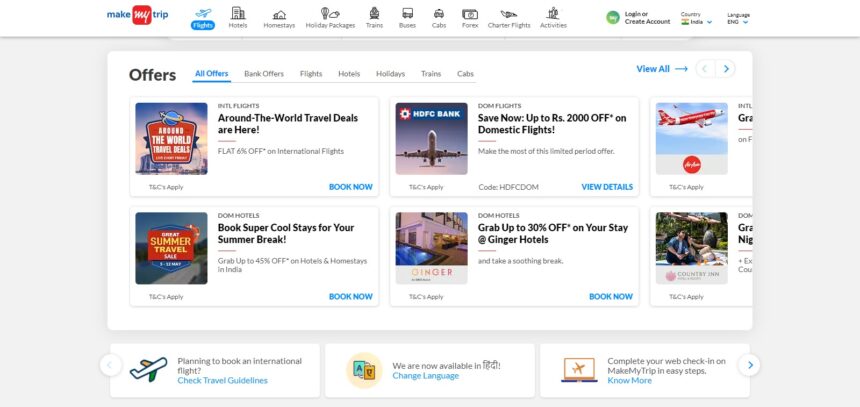
In this article, we’ll provide you with a step-by-step guide on how to delete MakeMyTrip account. Read our complete article we explain very easy way and all step is very simple .

Contents
  • How to Delete MakeMyTrip Account Explain Step By Step
  • What Is MakeMyTrip?
  • Conclusion
  • How to Delete MakeMyTrip Account FAQ?
    • Is it possible to delete my MakeMyTrip account from the mobile app?
    • Will deleting my MakeMyTrip account cancel any upcoming bookings?
    • How long does it take for MakeMyTrip to process my account deletion request?
    • Can I reactivate my MakeMyTrip account after deleting it?
    • What happens to my personal information after I delete my MakeMyTrip account?
    • Will I receive a confirmation email after deleting my MakeMyTrip account?

Are you considering deleting your MakeMyTrip account and looking for a simple and hassle-free way to do it? Look no further! In this article, we’ll provide you with a step-by-step guide on how to delete your account in just a few easy steps.

Firstly, it’s important to note that if you’re using Vinted anonymously, you’ll need to register your account first before you can delete it. To do that, follow these simple steps:

How to Delete MakeMyTrip Account Explain Step By Step

Sure, here are the step-by-step instructions on how to delete a MakeMyTrip account:

- Advertisement -
  1. Enter your username and password to log into your account on the MakeMyTrip website.
  2. Once you’ve logged in, go to the top right corner of the screen and click your profile symbol.
  3. Choose “Settings” from the drop-down menu, then “Privacy.”
  4. Click the “Delete Account” button at the bottom of the page when you have scrolled there.
  5. You will be prompted by MakeMyTrip to confirm your want to terminate your account. To continue, select “Yes”.
  6. The next step is for you to choose a cause for account deletion. From the drop-down menu, select the best choice.
  7. Click “Delete Account” once again to confirm your choice after choosing a reason.
  8. For security reasons, MakeMyTrip will require you to enter your password. Put in your password and click on “Delete Account” one final time.
  9. When you successfully remove your account, a notice verifying that will show up on the screen.
  10. A confirmation email from MakeMyTrip saying that your account has been terminated should appear in your inbox. You can use this email as evidence that your account has been deleted.

It’s crucial to understand that if you remove your MakeMyTrip account, their servers will permanently destroy all of your personal information, including booking history and preferences. Additionally, you will no longer have access to any reservations or bookings you have already made on the site.

What Is MakeMyTrip?

MakeMyTrip is an Indian online travel agency that offers several travel services, such as booking flights, hotels, vacation packages, and more. Having a large presence in nations like the United States and the United Arab Emirates, the business was formed in 2000 and has since emerged as one of India’s top travel platforms.

Users may browse, contrast, and book travel services from a number of airlines, hotels, and other travel service providers via MakeMyTrip’s web platform. Users may easily access their trip information while on the road thanks to the company’s mobile app, which is available for iOS and Android smartphones. Additionally, MakeMyTrip offers a variety of customer care options to help travellers with any queries or problems.

MakeMyTrip’s overall goal is to make booking and organising a trip as easy and smooth as possible, assisting customers in locating the greatest offers and selecting the ideal itinerary.

Conclusion

In just a few easy steps, you may delete your MakeMyTrip account. You may quickly and simply cancel your account and make sure that all of your personal information and travel data are deleted from MakeMyTrip’s servers by following the step-by-step instructions given. It’s crucial to keep in mind that when your account has been cancelled, you won’t have access to any past reservations or bookings made using the site. So, if you’re certain that you no longer need MakeMyTrip’s services, using this approach to easily deactivate your account and guarantee the security of your personal information is recommended.

- Advertisement -

How to Delete MakeMyTrip Account FAQ?

Is it possible to delete my MakeMyTrip account from the mobile app?

Yes, you can delete your MakeMyTrip account from the mobile app as well. The process is similar to deleting your account from the website. Simply log in to your account on the app, go to the “Settings” section, scroll down to “Privacy,” and select “Delete Account.”

Will deleting my MakeMyTrip account cancel any upcoming bookings?

Yes, if you delete your MakeMyTrip account, any upcoming bookings or reservations made through the platform will be cancelled. It’s important to make sure that you don’t have any pending bookings before deleting your account.

How long does it take for MakeMyTrip to process my account deletion request?

MakeMyTrip usually processes account deletion requests within a few minutes. However, it may take up to 24 hours for your account to be completely deleted from their servers.

Can I reactivate my MakeMyTrip account after deleting it?

No, once you have deleted your MakeMyTrip account, it cannot be reactivated. If you wish to use the platform again, you will need to create a new account.

What happens to my personal information after I delete my MakeMyTrip account?

All of your personal information, including booking history and preferences, will be permanently deleted from MakeMyTrip’s servers once your account is deleted. However, MakeMyTrip may retain some information for legal or regulatory reasons.

Will I receive a confirmation email after deleting my MakeMyTrip account?

Yes, MakeMyTrip will send you a confirmation email to your registered email address once your account has been successfully deleted. Be sure to check your inbox and spam folder for this email.


How to Delete Sofi Account: A Step-by-Step Guide
How to Delete Starbucks Account : A Step-by-Step Guide
How To Delete A Coinbase Mobile App: A Step-by-Step Guide
How To Delete A Microsoft Edge: A Step-by-Step Guide
How to Delete Lending tree Account: A Step-by-Step Guide
Share This Article
Facebook Pinterest Whatsapp Whatsapp LinkedIn Tumblr Reddit VKontakte Telegram Threads Bluesky Email Copy Link Print
ByCws Team
Follow:
One of Coinworldstory's longest-tenured contributors, and now one of our editors, Verna has authored over 2600+ stories for the site. When not writing or editing, He likes to play basketball, play guitar or visit remote places. Verna, to his regret, holds a very small amount of digital currencies. Verna Is team Members of 9 People
Previous Article Video Candy : How To Use & Free Guide Video Candy : How To Use & Free Guide
Next Article Crystalsound Ai Audio Editing Tool Review : How To Use & Free Guide Crystalsound Ai Audio Editing Tool Review : How To Use & Free Guide
TOP CRYPTO EXCHANGES

Best Crypto Exchanges

Kraken
Secure Trading
Visit
Bybit
Low Fees
Visit
HTX
Global Exchange
Visit
CoinSwitch
Easy INR Access
Visit
Poloniex
Altcoin Markets
Visit
TOP CRYPTO CASINOS
Best Crypto Casinos
Roobet
Roobet
Popular Casino
Visit
Stake
Stake
Top Sportsbook
Visit
BC.Game
BC.Game
Crypto Friendly
Visit
Rollbit
Rollbit
Casino + Trading
Visit
Duelbits
Duelbits
Instant Withdrawals
Visit

Find Us on Socials

TOP CRYPTO TOOLS
Best Crypto Tools
TradingView
Charts & Analysis
Visit
CoinGlass
Liquidation Data
Visit
CoinMarketCap
Market Tracking
Visit
DexScreener
DEX Analytics
Visit
Arkham
Wallet Tracking
Visit

Coinworldstory Ads

10 Best Decentralized Escrow Scripts for Crypto Deals 2026
Uncategorized Folder & File At Coinworldstory
10 Best Local Fiat Cash-to-Crypto Gateways Without Banks 2026
Best Centralized Exchange List 2026
10 Best Open-Source Python Crypto Trading Bots Offline
BOTS
AI vs Technical Analysis In Crypto Trading Guide 2026
Artificial Intelligence

Latest Published

How To Delete Tipz.io: A Step-by-Step Guide

How To Delete Tipz.io: A Step-by-Step Guide

2 years ago
How To Delete Bigo Account: A Step-by-Step Guide

How To Delete Bigo Account: A Step-by-Step Guide

3 years ago
How To Delete Kakaotalk Account: A Step-by-Step Guide

How To Delete Kakaotalk Account: A Step-by-Step Guide

3 years ago
How To Delete Samsung Account: A Step-by-Step Guide 

How To Delete Samsung Account: A Step-by-Step Guide 

3 years ago
◈
CoinWorldStory
Crypto News, Reviews & Blockchain Insights
✓ Editorial Standards ✓ Research Driven ✓ Updated Daily
📧 Email Us At: support@coinworldstory.com 💬 Join Telegram
nexo banner
  • ADVERTISEMENT
  • SUBMIT PR
  • CONTACT
  • GUEST POST
  • ABOUT US
  • DMCA
  • SITEMAP
  • DISCLAIMER
  • PRIVACY POLICY
  • llms.txt
  • Newsletter
10 Best SaaS Tools for Client Onboarding Automation Guide
Trending
Fake Airdrop Scam Explained: Protect Your Crypto Assets
Trending
10 Best Games To Play With Girlfriend Online – Top Picks
Trending
CoinworldstoryCoinworldstory
Follow US
© Coinworldstory News Network. Cws Design Company. All Rights Reserved.
  • ADVERTISEMENT
  • SUBMIT PR
  • CONTACT
  • GUEST POST
  • ABOUT US
  • DMCA
  • SITEMAP
  • DISCLAIMER
  • PRIVACY POLICY
  • llms.txt
  • Newsletter
coinworldstory logo coinworldstory logo
Welcome Back!

Sign in to your account

Username or Email Address
Password

Lost your password?