By using this site, you agree to the Privacy Policy and Terms of Use.
Accept
CoinworldstoryCoinworldstoryCoinworldstory
  • HOME
  • CRYPTO
    • AI
    • BOTS
    • ICO
    • AIRDROP
      • Featured Airdrops
    • Price Prediction
    • EXCHANGE
      • Best Centralized Exchange List 2026
      • Best Decentralized Exchange List 2025
    • ALTCOIN
    • Alt Coin Signal
    • Crypto Analysis
    • Bitcoin Loan
    • Bitcoin Mining
    • WALLETPRO
  • PR
    PR
    If You Looking For Submit Cryptocurrency Press Releases Than Coinworldstory Is Best Choice For Crypto Press Release Submission
    Show More
    Top News
    Binance Wallet and BTC L2 project BEVM launch an exclusive airdrop
    Binance Wallet and BTC L2 project BEVM launch an exclusive airdrop
    7 months ago
    CARV Announces Decentralized Node Sale to Revolutionize Data Ownership in Gaming and AI
    CARV Announces Decentralized Node Sale to Revolutionize Data Ownership in Gaming and AI
    8 months ago
    ORACLE MEME Coin Presale Achieves $208,000 Milestone in Minutes
    ORACLE MEME Coin Presale Achieves $208,000 Milestone in Minutes
    8 months ago
    Latest News
    Roobet Launches Prediction Markets on May 6, The First Major Crypto Casino to Integrate the Format
    4 hours ago
    DeLorean Brings Its Iconic IP to Solana
    2 days ago
    Rayls Public Chain Goes Live With Sub-Second Finality, EVM Compatibility and Quantum-Resistant Privacy
    5 days ago
    BitMart x $EAT Trade-to-Feed Competition to Pay Out $4.4M USDT to Traders in May 2026
    1 week ago
  • NEWS
    • Mining
    • Altcoins
    • Ban
    • BANKING/FINANCE NEWS
    • Bitcoin
    • Blockchain
    • CRYPTO CRIME
    • Ethereum
    • Exchange News
    • Government News
    NEWSShow More
    10 Apps That Show What You Should Have Done Instead
    10 Apps That Show What You Should Have Done Instead
    1 month ago
    10 Best Crypto Conferences to Attend in 2026
    10 Best Crypto Conferences to Attend in 2026
    1 month ago
    Emerging Markets Favor Stablecoins Over Bitcoin
    Emerging Markets Favor Stablecoins Over Bitcoin
    3 months ago
    10 Solana DEXs With Lowest Slippage for Memecoin Trading
    10 Solana DEXs With Lowest Slippage for Memecoin Trading
    3 months ago
    10 Best Low-Interest Debt Consolidation Loans for Prime Borrowers
    10 Best Low-Interest Debt Consolidation Loans for Prime Borrowers
    3 months ago
  • MORE
    • Guide
    • Only Best
    • Off Topic
    • Best Affiliate Marketing
    • Best Affiliate Programs
    • BOTS
    • Trusted Currency Exchanger Platform
    • Blockchain Games
    • Metaverse Review : Best Metaverse Program Review
    • Online Survey
    • Payment Platform
  • VPN
  • Contact Us
Reading: How To Use Kvm Switch Keyboard | Easy Guide
Share
Notification Show More
Font ResizerAa
CoinworldstoryCoinworldstory
Font ResizerAa
  • ADVERTISEMENT
  • SUBMIT PR
  • CONTACT
  • GUEST POST
  • ABOUT US
  • DMCA
  • SITEMAP
  • DISCLAIMER
  • PRIVACY POLICY
Search
  • HOME
  • CRYPTO
    • AI
    • BOTS
    • ICO
    • AIRDROP
    • Price Prediction
    • EXCHANGE
    • ALTCOIN
    • Alt Coin Signal
    • Crypto Analysis
    • Bitcoin Loan
    • Bitcoin Mining
    • WALLETPRO
  • PR
  • NEWS
    • Mining
    • Altcoins
    • Ban
    • BANKING/FINANCE NEWS
    • Bitcoin
    • Blockchain
    • CRYPTO CRIME
    • Ethereum
    • Exchange News
    • Government News
  • MORE
    • Guide
    • Only Best
    • Off Topic
    • Best Affiliate Marketing
    • Best Affiliate Programs
    • BOTS
    • Trusted Currency Exchanger Platform
    • Blockchain Games
    • Metaverse Review : Best Metaverse Program Review
    • Online Survey
    • Payment Platform
  • VPN
  • Contact Us
Have an existing account? Sign In
Follow US
© 2022 Foxiz News Network. Ruby Design Company. All Rights Reserved.
Home » Blog » How To Use Kvm Switch Keyboard | Easy Guide
Off Topic

How To Use Kvm Switch Keyboard | Easy Guide

Gixona
Last updated: 22/09/2025 4:07 PM
Gixona
10 months ago
Share
Disclosure: We are not a registered broker-dealer or an investment advisor. The services and information we offer are for sophisticated investors, and do not constitute personal investment advice, which of necessity must be tailored to your particular means and needs. !
How To Use Kvm Switch Keyboard | Easy Guide
SHARE

In the article, I focus on discussing the use of a KVM switch keyboard and how it can help you manage multiple computers using one keyboard, mouse, and monitor. Its setup, switching mechanisms, and troubleshooting basics will all be outlined.

Contents
  • What is a KVM Switch Keyboard?
  • How To Use Kvm Switch Keyboard
  • Switching Between Computers
  • Tips for Smooth Operation
  • Troubleshooting Common Problems
    • Advantages of Using a KVM Switch with Your Keyboard
  • Conclusion
  • FAQ
    • Can I use a wireless keyboard with a KVM switch?
    • How many computers can I connect?
    • Do I need special drivers?

You will be guided step by step towards achieving an organized workspace that enhances your productivity while yielding the best results.

What is a KVM Switch Keyboard?

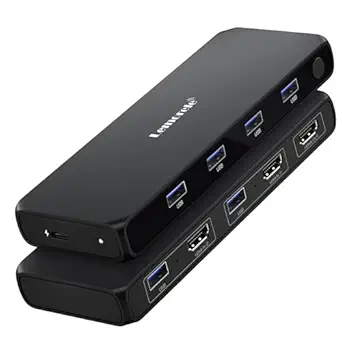
A single keyboard can control multiple computers with a KVM switch keyboard setup. A monitor and a mouse is also required. KVM means Keyboard, Video, and Mouse.

KVM switches serve the purpose of hubs that allow toggling between computers that are connected as long as there are no distinct KVM peripherals for each computer.
- Advertisement -

This is particularly advantageous for IT admins, gamers, or any users accessing multiple PCs in home offices. Control swap is accomplished through button clicks or keyboard shortcuts enabling instant toggling.

Space and cable clutter along with productivity are attained in addition to kiosk style multifunctional peripherals. Newer models of KVM switches have a wider range of supported connections, including USB and HDMI, extending to wireless and other extra configurations.

How To Use Kvm Switch Keyboard

Using Your Keyboard with a KVM Switch, A Case on USB KVM Switches
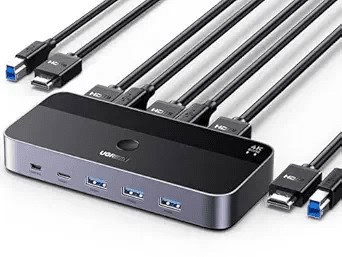
Let’s consider a basic USB KVM switch.

Connect your keyboard to the KVM switch port marked “Keyboard.”

- Advertisement -

Connect your mouse to its designated port and plug in your monitor cable (HDMI/DisplayPort/VGA) into the “Monitor” port.

Connect each computer to the switch using the provided KVM cables (typically one bundled cable per computer that carries USB and video).

Power on the KVM switch (if it has an external power requirement).

- Advertisement -

Turn on all computers that are connected.

To change PC control, press the KVM switch button or the hotkey (often Scroll Lock + Scroll Lock + 1/2).

With this configuration, your keyboard, mouse, and monitor will control the chosen computer instantaneously.

Switching Between Computers

Using physical buttons on the KVM

Simply press a button on the KVM switch to toggle control between the connected computers. Very straightforward and instant.

Using keyboard hotkeys (common shortcuts, e.g., Scroll Lock + Scroll Lock + number)

Switch between computers using a hotkey sequence. Commonly used are Scroll Lock or Control with a number target.

OSD (on-screen display) menus for advanced models

More sophisticated KVMs provide an on-screen menu for computer selection or configuration, providing intuitive visual control through your monitor.

Tips for Smooth Operation

Keep cables organized to avoid confusion

Labeling and arranging cables can eliminate mix-ups and unintentional disconnections, ensuring you’re aware of the computer connections.

Adjust keyboard/mouse settings if needed after switching

Some systems may overwrite preset layouts. Switch, check and adjust your keyboard and mouse for consistent command responsiveness.

Handle possible issues (lag, device not recognized)

For issues like sluggish input, unresponsive devices, check connections, reboot, and ensure firmware and drivers are up-to-date.

Troubleshooting Common Problems
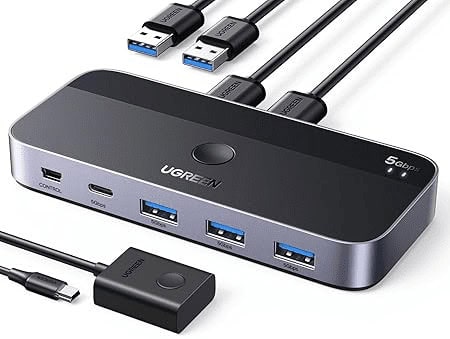
Keyboard not responding after switching

You can try to replug the keyboard or restart the KVM. With a bit of time, some systems will autodetect input.

Hotkeys not working

Make sure the correct sequence is enabled in the settings as some KVMs allow changing or disabling hotkey triggers.

Compatibility issues with specific keyboards (mechanical, RGB, etc.)

More sophisticated keyboards and peripherals might not function as intended. For best results, use generic keyboards or check the KVM’s list ad peripherals.

Firmware or driver considerations

To avoid unexpected detection problems, ensure the KVM firmware is updated, and all connected PCs have up-to-date USB and chipset drivers.

Advantages of Using a KVM Switch with Your Keyboard

Save space and reduce clutter

Integrating multiple computers into one workstation saves space by reducing the number of peripherals cluttering the work area.

Increase productivity with quick switching

Moving seamlessly from one computer to another through a switch streamlines multitasking and improves overall task management across systems.

Cost-effective vs. multiple peripherals

Minimize expenditures and resource usage with a KVM switch, eliminating the need for additional keyboards, mice, and monitors per each PC.

Conclusion

In conclusion, A KVM switch setup for keyboards is a clever technique to manage several computers through a single keyboard, mouse, and monitor interface.

It makes it possible to save on hardware expenses while simultaneously increasing efficiency and productivity. It is custom tailored workspaces which are tidy and unhindered making it ideal for home offices, gamers, or IT specialists.

FAQ

Can I use a wireless keyboard with a KVM switch?

Yes, if the KVM supports USB receivers. Some advanced KVMs work better with wireless sets than basic models.

How many computers can I connect?

Most KVM switches handle 2–4 computers, while enterprise models can support 8 or more.

Do I need special drivers?

Generally no. Most KVMs are plug-and-play, though firmware updates may help fix quirks.

9 Top Websites for Last-Minute Travel Deals Online Guide
10 Best Offline Travel Apps for Easy Stress-Free Trips
10 Best Online MBA Programs For Executive Leadership 2026
10 Best WhatsApp Marketing SaaS Tools In India (2026 Guide)
10 Best Truck Accident Attorneys: Choose Top Legal Help
Share This Article
Facebook Email Print
Previous Article How To Use Microsoft Lists Effectively: Best Tips & Examples How To Use Microsoft Lists Effectively: Best Tips & Examples
Next Article How To Solve Logarithmic Equations: Simple Step-by-Step Guide How To Solve Logarithmic Equations: Simple Step-by-Step Guide

Find Us on Socials

Coinworldstory Ads

17 Top MSSPs for Cyber Defense: Secure Your Business Today
Software
Roobet Launches Prediction Markets on May 6, The First Major Crypto Casino to Integrate the Format
Press Releases
10 Cybersecurity SaaS Tools Every Small Business Needs 2026
Software
10 SaaS Tools Bootstrapped Startups Use Instead of Enterprise
Uncategorized Folder & File At Coinworldstory

Latest Published

17 Critical Steps To Find a Mesothelioma Lawyer Easily

17 Critical Steps To Find a Mesothelioma Lawyer Easily

2 weeks ago
10 Best Forex Trading Infrastructure for Ultra-Low Latency VPS

10 Best Forex Trading Infrastructure for Ultra-Low Latency VPS

4 weeks ago
10 Best Travel Agencies for Adventure Travel Worldwide

10 Best Travel Agencies for Adventure Travel Worldwide

3 months ago
10 Best Luxury Travel Agency for Private Tours Worldwide

10 Best Luxury Travel Agency for Private Tours Worldwide

3 months ago
nexo banner
  • ADVERTISEMENT
  • SUBMIT PR
  • CONTACT
  • GUEST POST
  • ABOUT US
  • DMCA
  • SITEMAP
  • DISCLAIMER
  • PRIVACY POLICY
10 Best Mobile Games Supporting 120 FPS for Smooth Gameplay
Trending
10 Best High Graphics Android Games for Phones with 4GB RAM
Trending
10 Best Travel Agency For Religious Tours Worldwide
Trending
CoinworldstoryCoinworldstory
Follow US
© Coinworldstory News Network. Cws Design Company. All Rights Reserved.
  • ADVERTISEMENT
  • SUBMIT PR
  • CONTACT
  • GUEST POST
  • ABOUT US
  • DMCA
  • SITEMAP
  • DISCLAIMER
  • PRIVACY POLICY
coinworldstory logo coinworldstory logo
Welcome Back!

Sign in to your account

Username or Email Address
Password

Lost your password?