By using this site, you agree to the Privacy Policy and Terms of Use.
Accept
CoinworldstoryCoinworldstoryCoinworldstory
  • HOME
  • CRYPTO
    • AI
    • BOTS
    • ICO
    • AIRDROP
      • Featured Airdrops
    • Price Prediction
    • EXCHANGE
      • Best Centralized Exchange List 2026
      • Best Decentralized Exchange List 2025
    • ALTCOIN
    • Alt Coin Signal
    • Crypto Analysis
    • Bitcoin Loan
    • Bitcoin Mining
    • WALLETPRO
  • PR
    PR
    If You Looking For Submit Cryptocurrency Press Releases Than Coinworldstory Is Best Choice For Crypto Press Release Submission
    Show More
    Top News
    The Aerum Ecosystem, A Market-Oriented Hub
    The Aerum Ecosystem, A Market-Oriented Hub
    4 years ago
    Worldwide Blockchain and AI communities team up to produce over 100 potential solutions to aide coronavirus pandemic
    Worldwide Blockchain And Ai Communities Team Up To Produce Over 100 Potential Solutions To Aide Coronavirus Pandemic
    5 years ago
    Gravity Sport, a leading-edge NFT marketplace, becomes a second partner of Parma Calcio 1913
    3 years ago
    Latest News
    Nexpace Announces NXPC Buyback Program to Reinforce User-Centered Ecosystem Growth in MapleStory Universe
    3 days ago
    OSL Strengthens Asia’s Digital Asset Ecosystem with Listing of State-Supervised Gold-Backed Stablecoin USDKG
    4 days ago
    Sui Launches Gasless Stablecoin Transfers With Support From Fireblocks
    4 days ago
    $100/Month in Bitcoin Since 2015 Would Have Turned $13,700 Into $632,000, Coinbird Analysis Shows
    6 days ago
  • NEWS
    • Mining
    • Altcoins
    • Ban
    • BANKING/FINANCE NEWS
    • Bitcoin
    • Blockchain
    • CRYPTO CRIME
    • Ethereum
    • Exchange News
    • Government News
    NEWSShow More
    10 Hidden Liquidity Features Modern Brokers Secretly Use
    10 Hidden Liquidity Features Modern Brokers Secretly Use
    2 weeks ago
    10 Apps That Show What You Should Have Done Instead
    10 Apps That Show What You Should Have Done Instead
    2 months ago
    10 Best Crypto Conferences to Attend in 2026
    10 Best Crypto Conferences to Attend in 2026
    2 months ago
    Emerging Markets Favor Stablecoins Over Bitcoin
    Emerging Markets Favor Stablecoins Over Bitcoin
    3 months ago
    10 Solana DEXs With Lowest Slippage for Memecoin Trading
    10 Solana DEXs With Lowest Slippage for Memecoin Trading
    3 months ago
  • MORE
    • Guide
    • Only Best
    • Off Topic
    • Best Affiliate Marketing
    • Best Affiliate Programs
    • BOTS
    • Trusted Currency Exchanger Platform
    • Blockchain Games
    • Metaverse Review : Best Metaverse Program Review
    • Online Survey
    • Payment Platform
  • VPN
  • Contact Us
Reading: How To Sell Tickets On Ticketmaster – Complete Guide (2025)
Share
Notification Show More
Font ResizerAa
CoinworldstoryCoinworldstory
Font ResizerAa
  • ADVERTISEMENT
  • SUBMIT PR
  • CONTACT
  • GUEST POST
  • ABOUT US
  • DMCA
  • SITEMAP
  • DISCLAIMER
  • PRIVACY POLICY
  • llms.txt
Search
  • HOME
  • CRYPTO
    • AI
    • BOTS
    • ICO
    • AIRDROP
    • Price Prediction
    • EXCHANGE
    • ALTCOIN
    • Alt Coin Signal
    • Crypto Analysis
    • Bitcoin Loan
    • Bitcoin Mining
    • WALLETPRO
  • PR
  • NEWS
    • Mining
    • Altcoins
    • Ban
    • BANKING/FINANCE NEWS
    • Bitcoin
    • Blockchain
    • CRYPTO CRIME
    • Ethereum
    • Exchange News
    • Government News
  • MORE
    • Guide
    • Only Best
    • Off Topic
    • Best Affiliate Marketing
    • Best Affiliate Programs
    • BOTS
    • Trusted Currency Exchanger Platform
    • Blockchain Games
    • Metaverse Review : Best Metaverse Program Review
    • Online Survey
    • Payment Platform
  • VPN
  • Contact Us
Have an existing account? Sign In
Follow US
© 2022 Foxiz News Network. Ruby Design Company. All Rights Reserved.
Home » Blog » How To Sell Tickets On Ticketmaster – Complete Guide (2025)
Guide & Crypto Education

How To Sell Tickets On Ticketmaster – Complete Guide (2025)

Indu Sonali
Last updated: 21/09/2025 10:41 AM
Indu Sonali
10 months ago
Share
Disclosure: We are not a registered broker-dealer or an investment advisor. The services and information we offer are for sophisticated investors, and do not constitute personal investment advice, which of necessity must be tailored to your particular means and needs. !
How To Sell Tickets On Ticketmaster – Complete Guide (2025)
SHARE

In this guide, I will explain how to sell your tickets on Ticketmaster in a safe and simple manner. If you have tickets to a concert, sports event, or a theater show that you cannot attend, you can list and sell them on Ticketmaster.

Contents
  • Brief Overview of Ticketmaster
  • How To Sell Tickets On Ticketmaster
  • Why Selling tickets on Ticketmaster is safe and Convenient
  • How Does Pricing Work?
  • Tips for Selling Tickets Faster
  • Common Issues and How To Fix Them
  • Conclusion
  • FAQ
    • Can I sell any ticket on Ticketmaster?
    • How do I list my tickets?
    • Are there any fees?

I will walk you through each process with detailed explanations on pricing, listing, and receiving payments in a timely manner.

Brief Overview of Ticketmaster

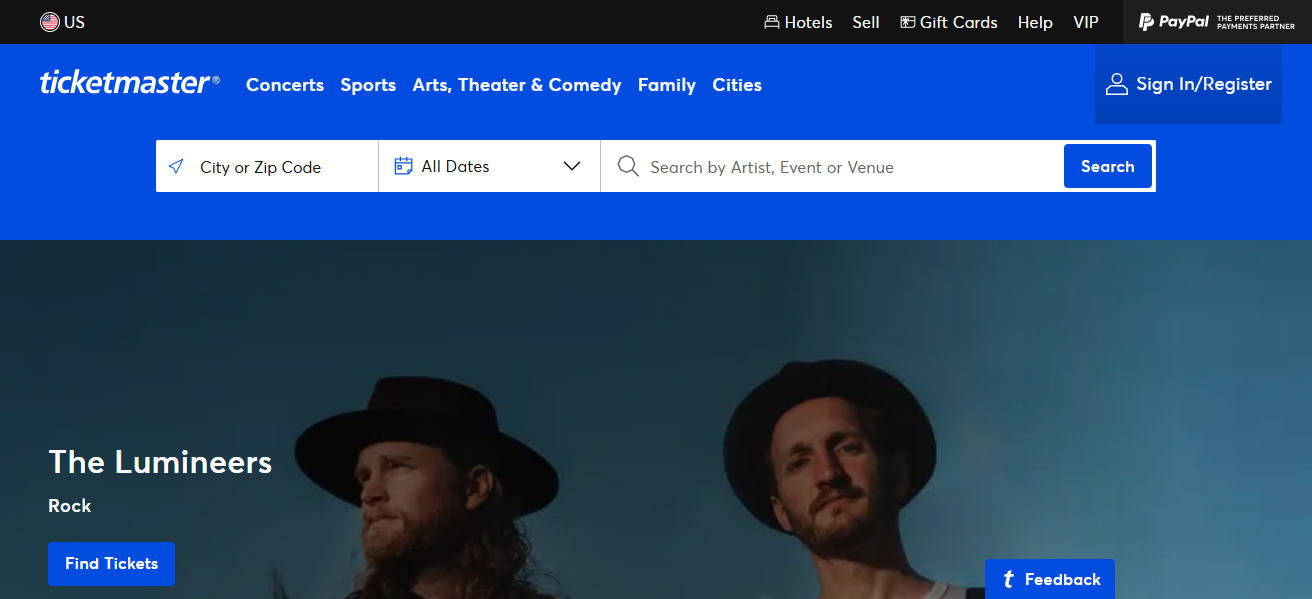
Established in 1976, Ticketmaster is one of the world’s foremost companies specializing in ticket sales and distribution.

The company has services for tickets to various concerts and live sports events. In addition to having a strong reputation for servicing large venues, The company is well known for its online and mobile ticket purchasing systems.
- Advertisement -
Brief Overview of Ticketmaster

In 2010, it merged with Live Nation to form Live Nation Entertainment, further solidifying its market leadership in live events and expansion of the business.

Ticketmaster has continued to grow globally, but there has been growing concern about their competition practices, high service fees, and ticket scalping which has brought ire and examination of the company’s business practices all over the world, most noticeably the United States.

Visit Now

How To Sell Tickets On Ticketmaster

Take One Platform Example: Selling Tickets on Ticketmaster

Set Up Your Ticketmaster Account

Navigate to “ticketmaster.com” and register for a verified account. Make sure your account details, including payment information, are correct.

- Advertisement -

Route to Your Counters

  • Log in and go to your personal area, “My Tickets.”
  • Select the event you want to sell tickets for.
  • Click “Sell” and choose the tickets you want to list.

Set Your Price

You can set your own price or follow Ticketmaster’s price suggestions based on market demand.

- Advertisement -

Publish Your Listing

Your tickets are now active on Ticketmaster’s resale marketplace.

Get Paid

Usually within a few business days, you will have your payment sent to you.

Why Selling tickets on Ticketmaster is safe and Convenient

Selling tickets on Ticketmaster is secure because the system utilizes a controlled, authenticated system that guarantees delivery of the tickets to the purchaser. There is no possibility of losing your tickets due to unverified transactions.

The system is designed to prevent resale of non-verified tickets, so both parties are protected. There is no need to meet with anyone or send anything physically; everything is managed online.

There are no challenges when it comes to setting listing prices. Convenience charging allows sellers to input their own figure.

In as much as the auto payment system is in place, no manual input is needed as payments go through automatically on sale completion. Customer service boosts reliability even more.

How Does Pricing Work?
How Does Pricing Work?

Being a seller on Ticketmaster comes with the privilege of pricing your tickets the way you want, but there are some vital considerations to bear in mind:

Set Your Own Price

You have the freedom to preset the amount you wish for each ticket. For your convenience, Ticketmaster will sometimes provide competitive pricing suggestions based on demand, similar listings, or market trends.

Dynamic Pricing (for Some Events)

For certain events, dynamically adjusted pricing is in use—this is referred to as dynamic pricing. It works clockwise by increasing or decreasing the price in real-time according to demand. Primary and resale tickets are both subject to this pricing.

Fees

A seller fee will be assessed to you with deduction made the seller fee, service fee, and a payment fee that must paid strictly by the buyer.

Payout

With regards to pay, you will after the event or after the customer has received the ticket, settled the ticket, and accepted payment be receiving pay, Sending via the accepted earning method (pay rate minus fees)and your fee, your fee will be deducted.

Tips for Selling Tickets Faster

Pricing StrategyTo gain more buyers, check other listings and set your price relatively lower.

Time to ListYour chances of reaching more potential buyers increases with time, hence, listing your tickets well in advance is important.

Disable Waiting PeriodsEnsure your tickets are available for instant transfer. Buyers prefer instant access to what they have purchased.

Follow Optimal Pricing SuggestionsUse Ticketmaster Pro’s suggestions and adjusted pricing based on market conditions to remain relevant.

Market, If You CanUse your personal platforms to market your listing if permitted; this will broaden your client base.

Prioritize Value over PriceAs the event date draws nearer, consider slashing the price slightly to sell faster.

Common Issues and How To Fix Them

Problem: “Sell” Button Is Not VisibleSolution: Not all tickets qualifies for resale. Check to see if your specific event permits resale. Also make sure you are using the right Ticketmaster account that has the tickets.

Problem: Tickets Are Not Displayed In User AccountSolution: Ensure that you purchased the tickets via Ticketmaster. If yes, look in the “My Tickets” section or reach out to customer service so they can help you find them.

Problem: Payment Processing LagsSolution: Payments are typically completed after the tickets have been delivered or the event has taken place. Ensure that your preferred payment method is properly configured in your account settings.

Problem: There Is An Issue With Listing TicketsSolution: Confirm all mandatory ticket information is filled in, the internet connection is stable, the browser is current, and try clearing your cache or switching browsers.

Problem: Tickets Are Not SellingSolution: Review your pricing and decrease it if necessary, also check that your tickets are set for immediate transfer. Remember that timing is key; most people sell tickets as the event date approaches.

Conclusion

To sum up the discussion, your tickets can be bought and sold via Ticketmaster with simplicity, safety, and effectiveness.

The steps to sell your ticket are minimal, and you can take advantage of a trusted system, wireless payment methods, adjustable pricing, and a/c verification.

Adhering to policies also aids in fast sales and boosts visibility while keeping you from unofficial resale platforms.

FAQ

Can I sell any ticket on Ticketmaster?

Only eligible, verified tickets purchased through Ticketmaster or its partners can be resold.

How do I list my tickets?

Go to “My Tickets,” select the event, click “Sell,” set your price, and publish the listing.

Are there any fees?

Yes, a seller fee is deducted from your payout. The amount varies by event and location.

Identity-as-a-Service: Passwordless Social Media Logins
10 Best Systems for Portfolio Regime Switching Models
10 No-Code AI Workflows to Scale Small Businesses to 7-Figures
10 AI Tools Turning Crypto Gains Into Everyday Spending
SocialFi: Monetize Micro-Influencer Communities With Keys
Share This Article
Facebook Email Print
Previous Article How To Buy DEGEN Coin – A Beginner’s Guide (2025) How To Buy DEGEN Coin – A Beginner’s Guide (2025)
Next Article How To Choose A Reliable Dex: Key Tips for Safe Crypto Trading How To Choose A Reliable Dex: Key Tips for Safe Crypto Trading
TOP CRYPTO EXCHANGES

Best Crypto Exchanges

Kraken
Secure Trading
Visit
Bybit
Low Fees
Visit
HTX
Global Exchange
Visit
CoinSwitch
Easy INR Access
Visit
Poloniex
Altcoin Markets
Visit
TOP CRYPTO CASINOS
Best Crypto Casinos
Roobet
Roobet
Popular Casino
Visit
Stake
Stake
Top Sportsbook
Visit
BC.Game
BC.Game
Crypto Friendly
Visit
Rollbit
Rollbit
Casino + Trading
Visit
Duelbits
Duelbits
Instant Withdrawals
Visit

Find Us on Socials

TOP CRYPTO TOOLS
Best Crypto Tools
TradingView
Charts & Analysis
Visit
CoinGlass
Liquidation Data
Visit
CoinMarketCap
Market Tracking
Visit
DexScreener
DEX Analytics
Visit
Arkham
Wallet Tracking
Visit

Coinworldstory Ads

10 Best Fitness Trackers & Smartwatches for Health Tracking
Software
10 Best AI Agents For Sales Teams To Boost Lead Generation
Artificial Intelligence
10 Best AI Agents For HR & Employee Onboarding Guide 2026
Artificial Intelligence
Top 10 AI Agents for Supply Chain & Logistics 2026
Artificial Intelligence

Latest Published

2026 Global Crypto Accord: Key Regulatory Impacts Explained

2026 Global Crypto Accord: Key Regulatory Impacts Explained

1 month ago
Passive Income Ideas: Earn Money While You Sleep

Passive Income Ideas: Earn Money While You Sleep

1 month ago
10 Generative Engine Optimization (GEO) Secrets for ChatGPT Ranking

10 Generative Engine Optimization (GEO) Secrets for ChatGPT Ranking

2 months ago
Decentralized Insurance Pools: Protect Against Smart Contract Risks

Decentralized Insurance Pools: Protect Against Smart Contract Risks

2 months ago
nexo banner
  • ADVERTISEMENT
  • SUBMIT PR
  • CONTACT
  • GUEST POST
  • ABOUT US
  • DMCA
  • SITEMAP
  • DISCLAIMER
  • PRIVACY POLICY
  • llms.txt
Fake Airdrop Scam Explained: Protect Your Crypto Assets
Trending
10 Best Games To Play With Girlfriend Online – Top Picks
Trending
10 Best Mobile Games Supporting 120 FPS for Smooth Gameplay
Trending
CoinworldstoryCoinworldstory
Follow US
© Coinworldstory News Network. Cws Design Company. All Rights Reserved.
  • ADVERTISEMENT
  • SUBMIT PR
  • CONTACT
  • GUEST POST
  • ABOUT US
  • DMCA
  • SITEMAP
  • DISCLAIMER
  • PRIVACY POLICY
  • llms.txt
coinworldstory logo coinworldstory logo
Welcome Back!

Sign in to your account

Username or Email Address
Password

Lost your password?